Inside ZEN
OAD scripting
Customize a complete ZEN workflow with internal IronPython scripts.
Use ZEN's internal functionalityZEISS ZEN / Smart Microscopy / November 2026
Use sample information to choose what ZEN does next: adapt an experiment, find a target, or orchestrate a complete workflow.
 Observe the sampleAcquire an overview, not every detail.
 Identify what mattersTurn pixels into target locations.
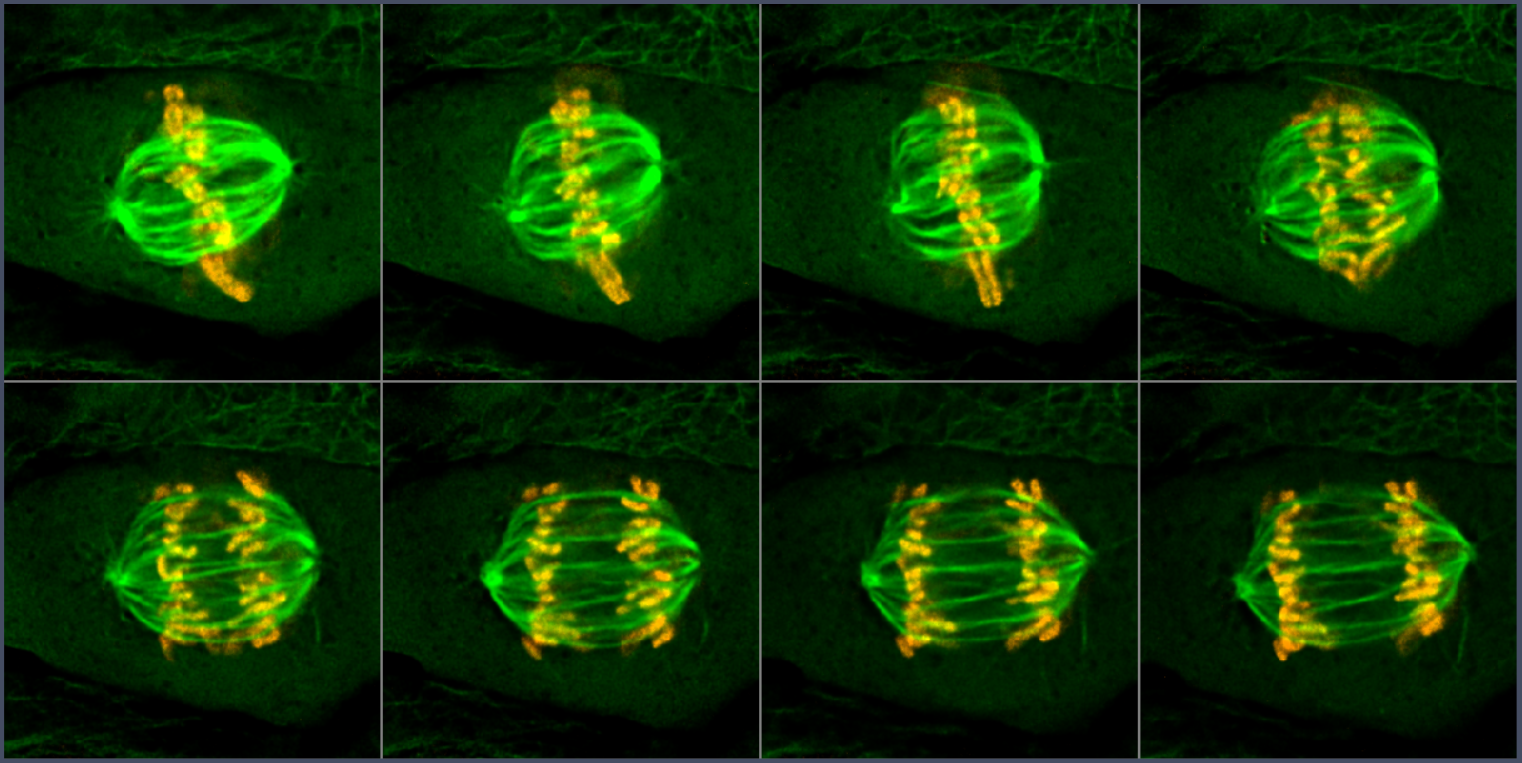 Acquire selectivelyRecord the event at useful resolution.
The short answer
Inside ZEN
Customize a complete ZEN workflow with internal IronPython scripts.
Use ZEN's internal functionalityDuring acquisition
React to analysis results or changing system observables in a running experiment.
Adapt the active acquisitionBetween overview and detail
Find objects, then image only those objects in detail. Use the module or an OAD script.
Select targets automaticallyOutside ZEN
Let an external application coordinate ZEN, Python analysis, and other workflow components.
Build an external control loopGuided Acquisition is a workflow pattern, not a transport protocol. The module, an OAD script, or a ZEN-API client can implement that pattern.
Start with the built-in module when it fits. Add scripting or an external client only where the application needs more flexibility.
Basis: Experiment Feedback documentation, Guided Acquisition documentation, and public ZEN-API overview.
The interface landscape
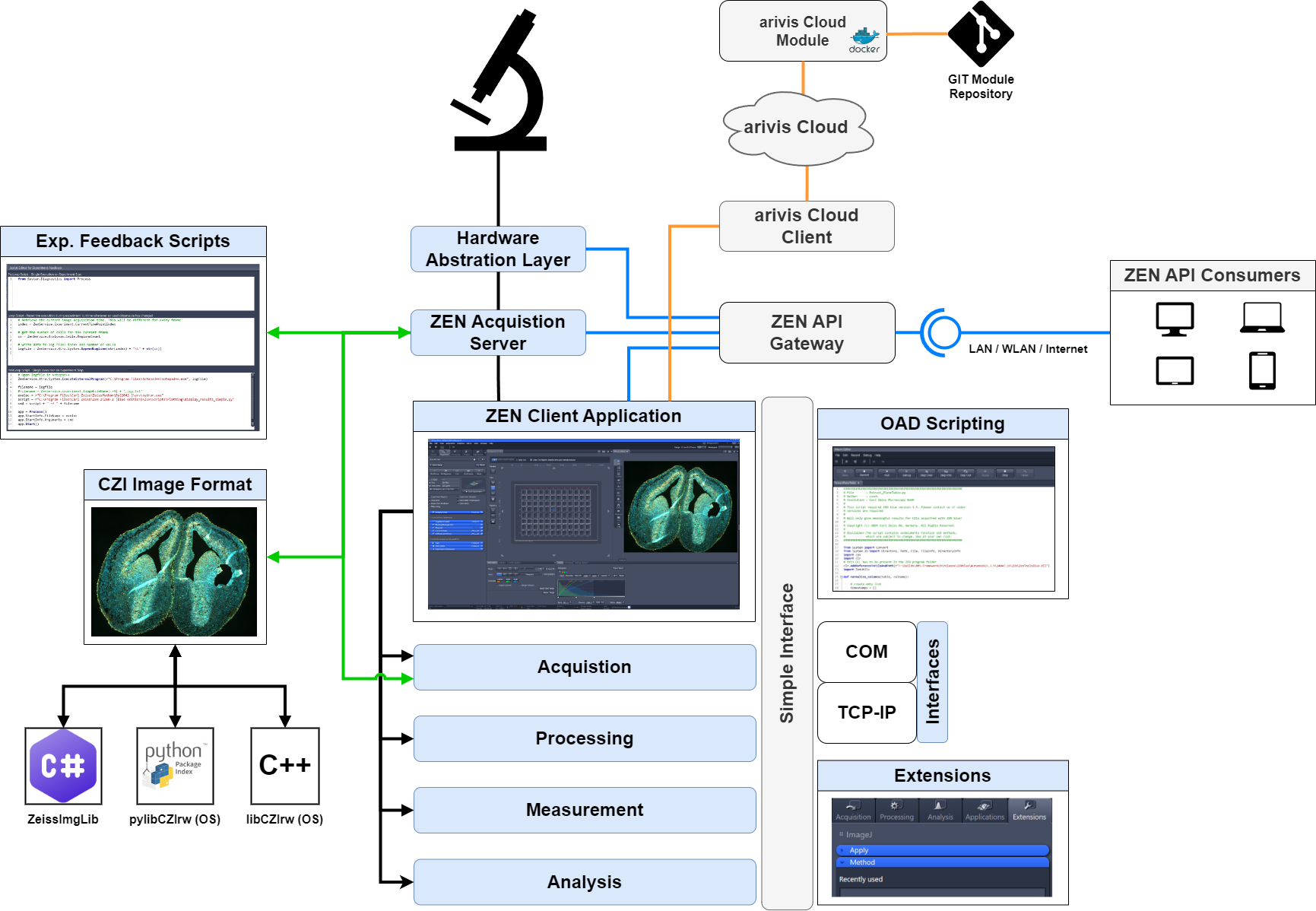
The TCP/IP scripting interface and the gRPC-based ZEN-API are not the same protocol. A TCP/IP macro command is not a ZEN-API method.
Reference: included interface overview. Exact availability depends on the ZEN edition, version, licensed functionality, and instrument.
Open Application Development
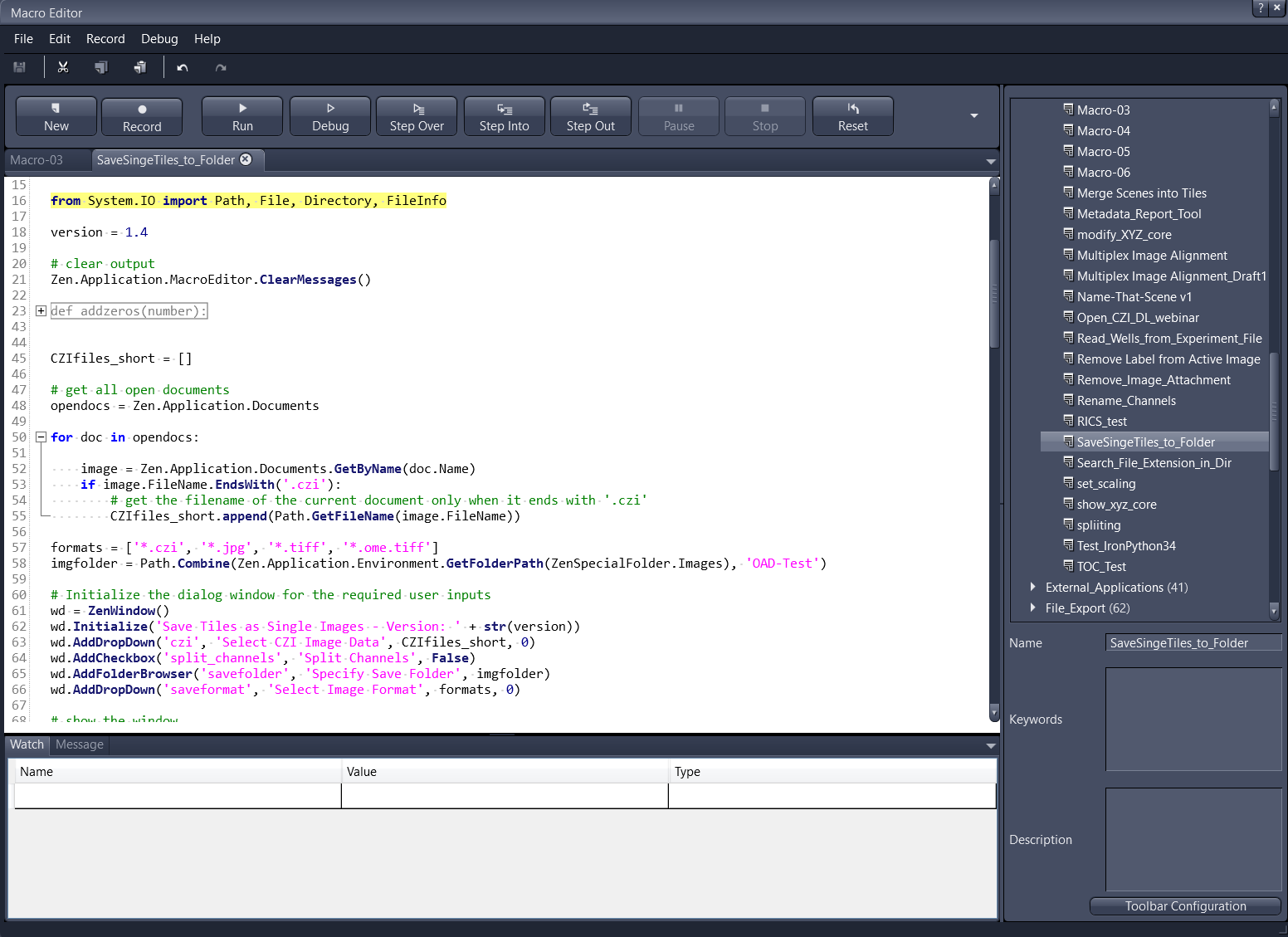
Record supported operations, edit scripts, and combine acquisition, processing, analysis, saving, and user dialogs.
External Python, Fiji, or other software can be invoked from a script. That adds a process and data handoff; it does not turn IronPython into CPython.
It is not a promise that every UI operation is recordable. An unrecorded operation may still have a scripting command. OAD is also not synonymous with the Guided Acquisition module: the script is one way to implement a custom guided workflow.
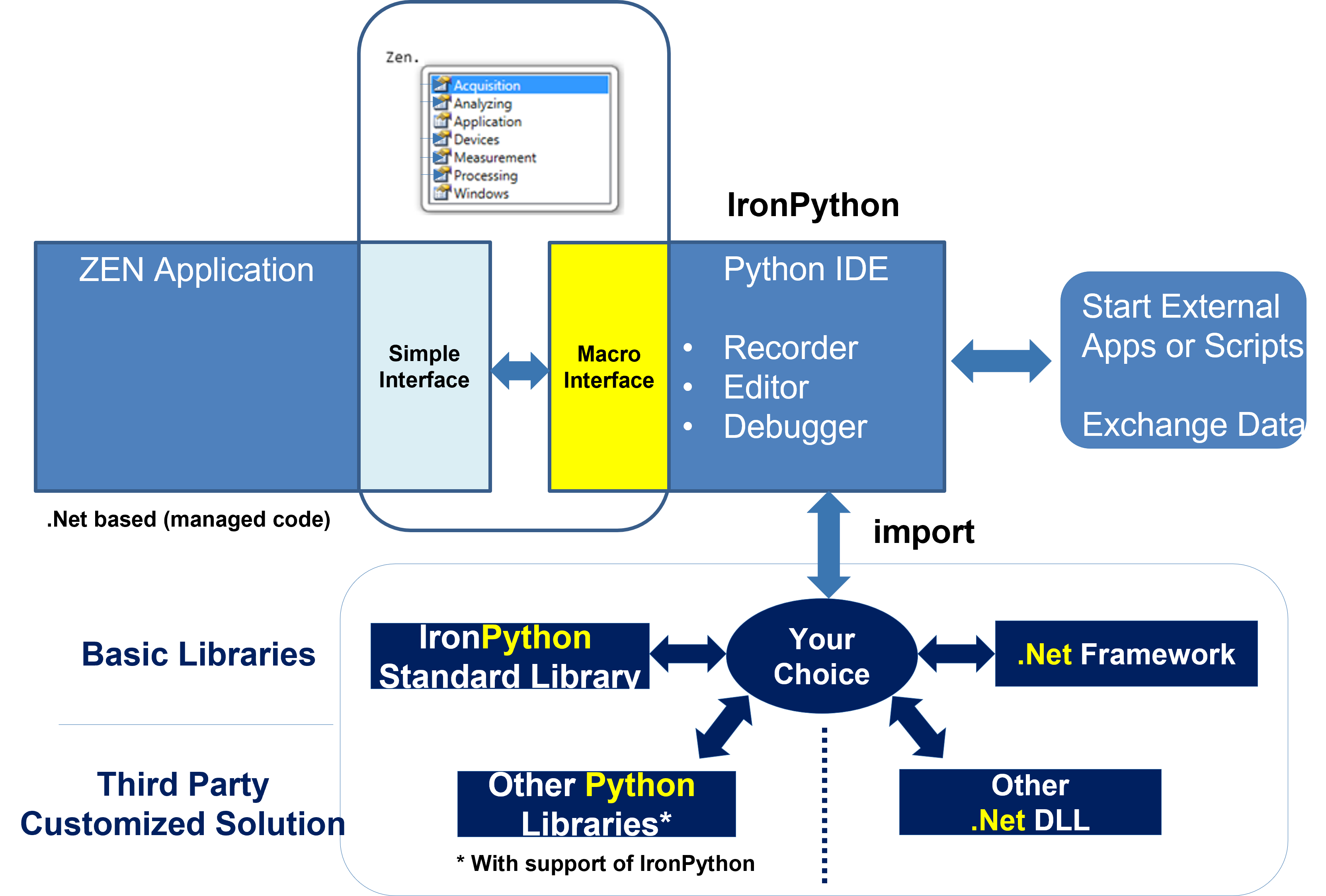
Basis: included OAD runtime illustration and public ZEN-API README: API and internal scripting.
Adaptive Acquisition Engine
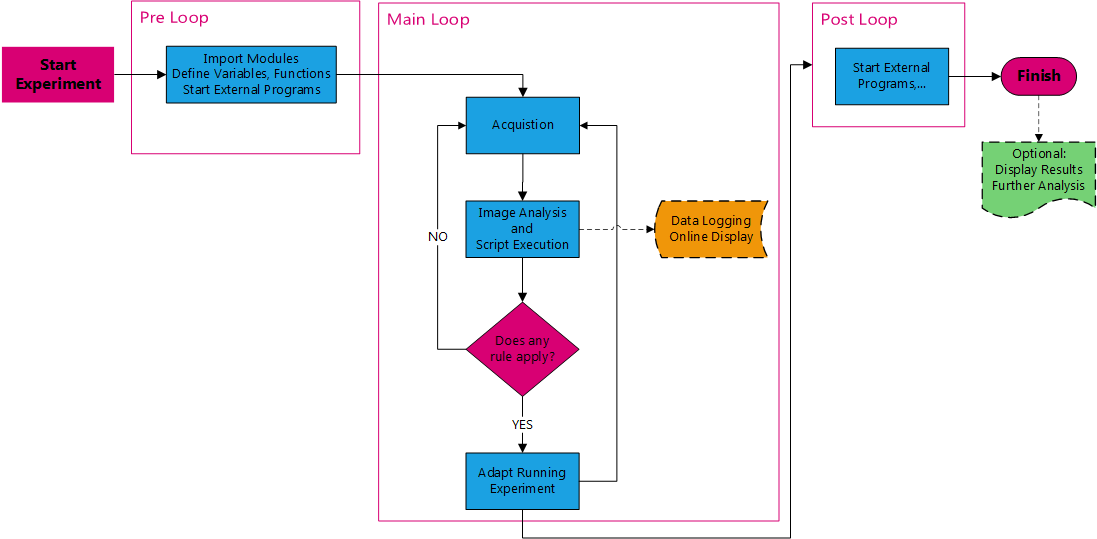
Import modules, define functions, and initialize variables at the start of the experiment.
Evaluate rules when a used observable changes. Read online measurements or hardware state and issue permitted actions.
Write final results or start follow-up work when acquisition finishes. The feedback script is stored in the experiment.
The Loop script is triggered by changes in observables used by the script. It does not automatically execute forever or once per arbitrary time interval.
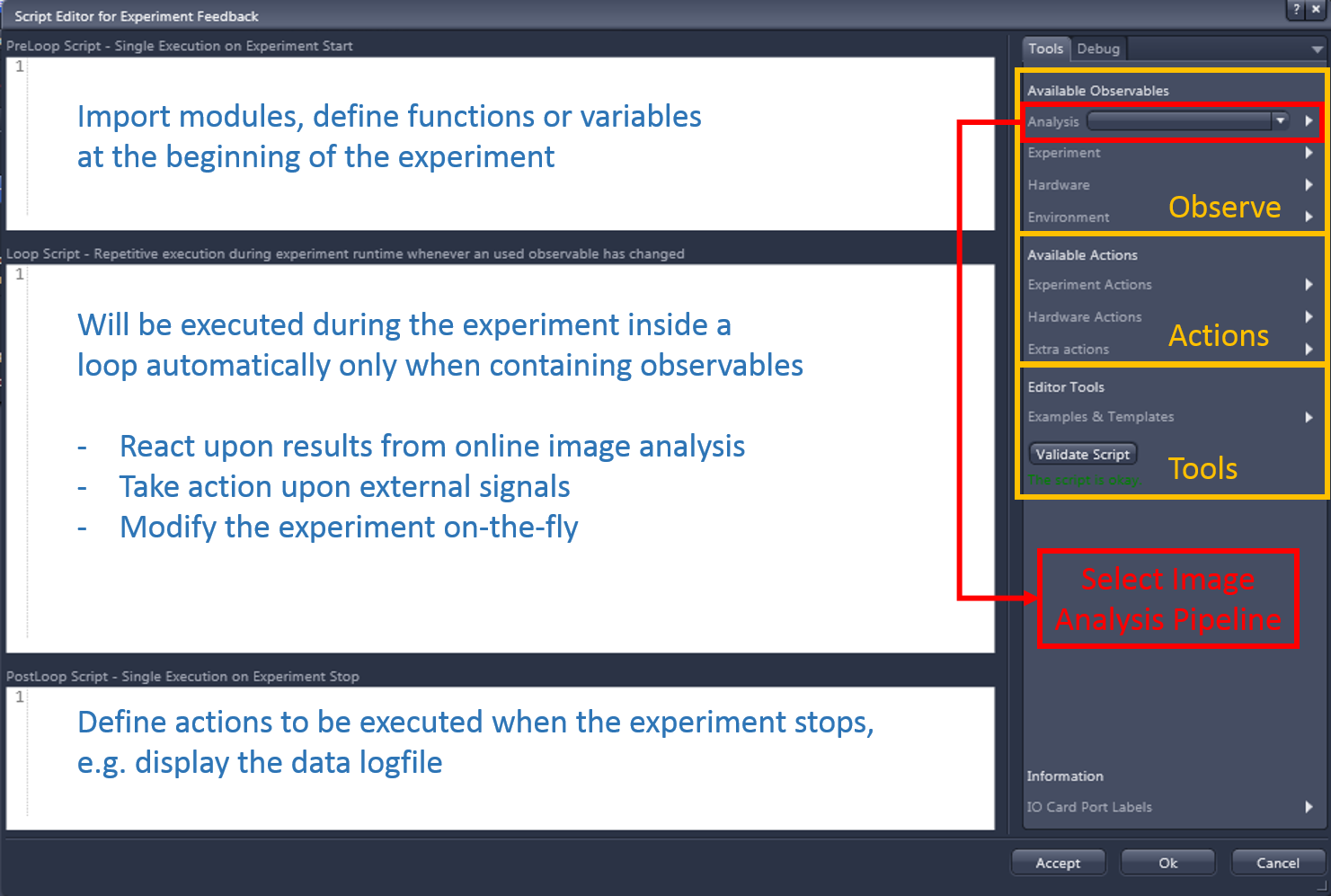
Script execution can overlap online analysis and disk writing. This mode does not guarantee their completion first.
Select an order in which analysis finishes before the script runs when the rule needs current measurements.
Use the order that also completes image writing before starting external software that must read those pixels.
Define the required measurements in the image-analysis setting first. Reload a changed setting in the feedback editor. Synchronization and script cost affect acquisition timing.
ZEN 3.14 tutorial, pages 7-11. The source also distinguishes Free Run from Synchronized execution; select the appropriate execution order in that version's UI.
Overview / detection / detailed acquisition
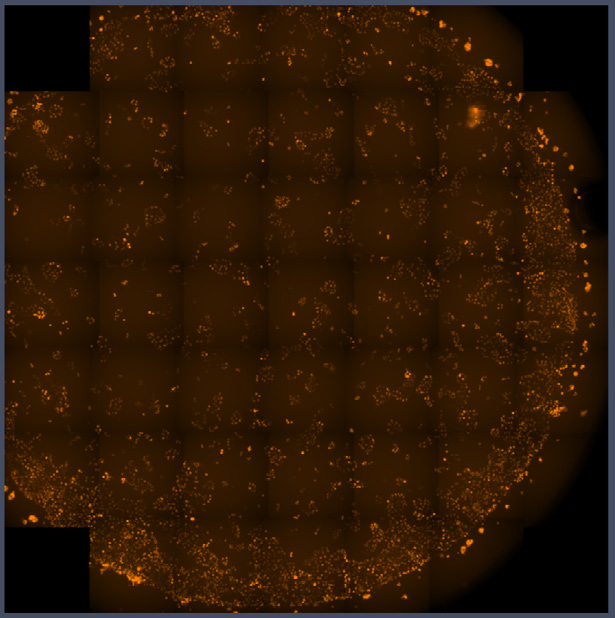
Acquire an overviewFind where objects are.Detect targetsBuild a region list.Scan selected regionsAcquire the required detail.A dedicated module provides a streamlined UI. Select overview and detail experiments, optional processing, and an image-analysis setting.
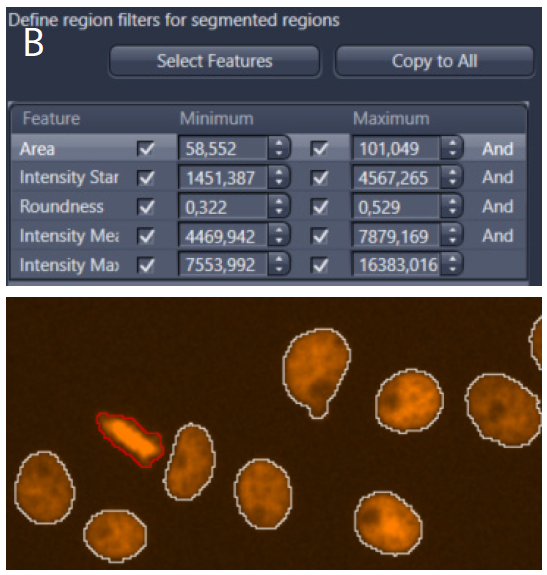
ZEN Guided Acquisition can incorporate machine-learning and deep-learning methods to detect objects in the overview:
Available methods depend on the ZEN version, enabled analysis features, and model compatibility. External inference requires a configured integration, such as a scripted handoff; it is not automatically part of the standard module sequence. The Semantic Pixel Classifier is a machine-learning option, not necessarily a deep-learning model.
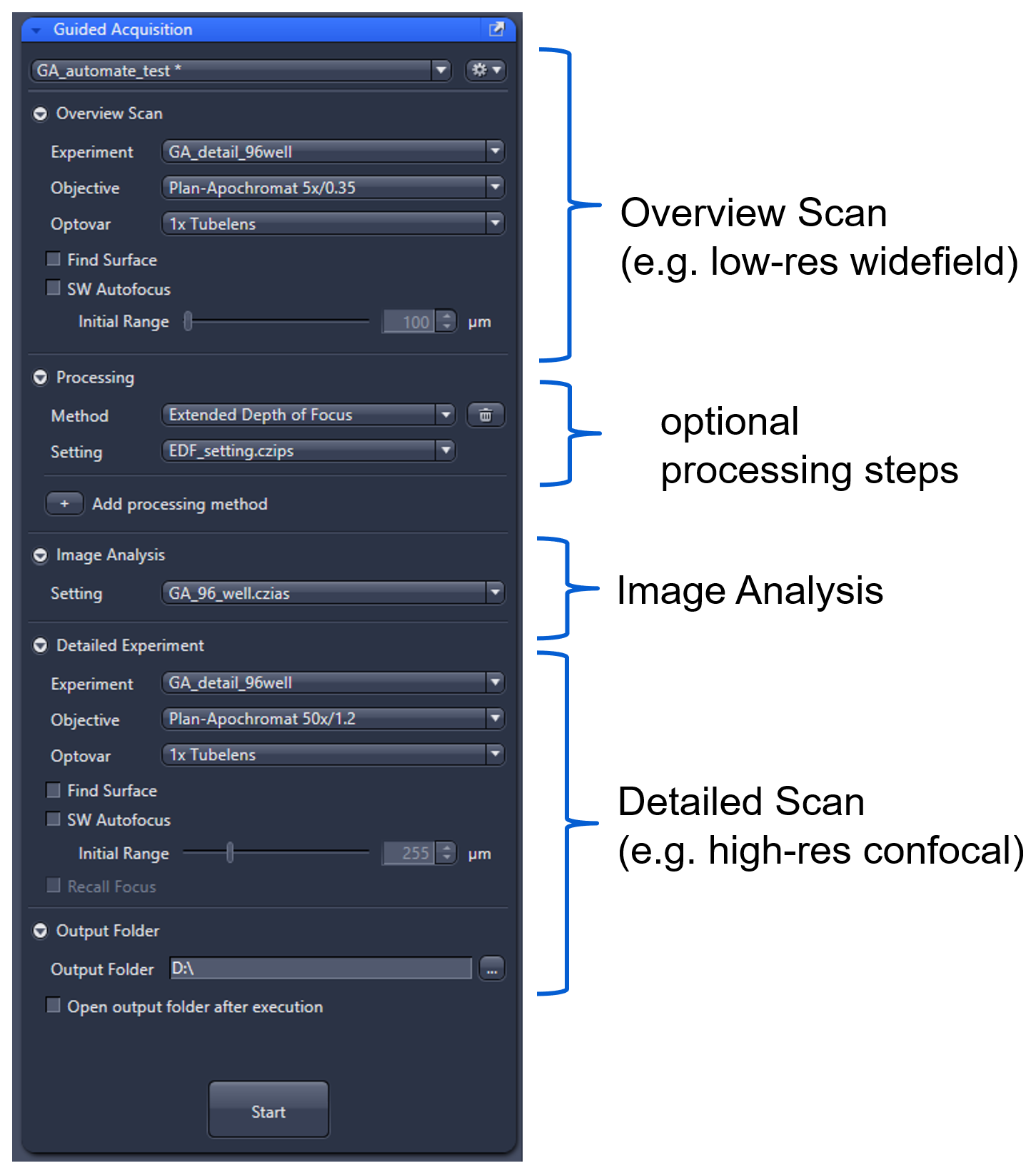
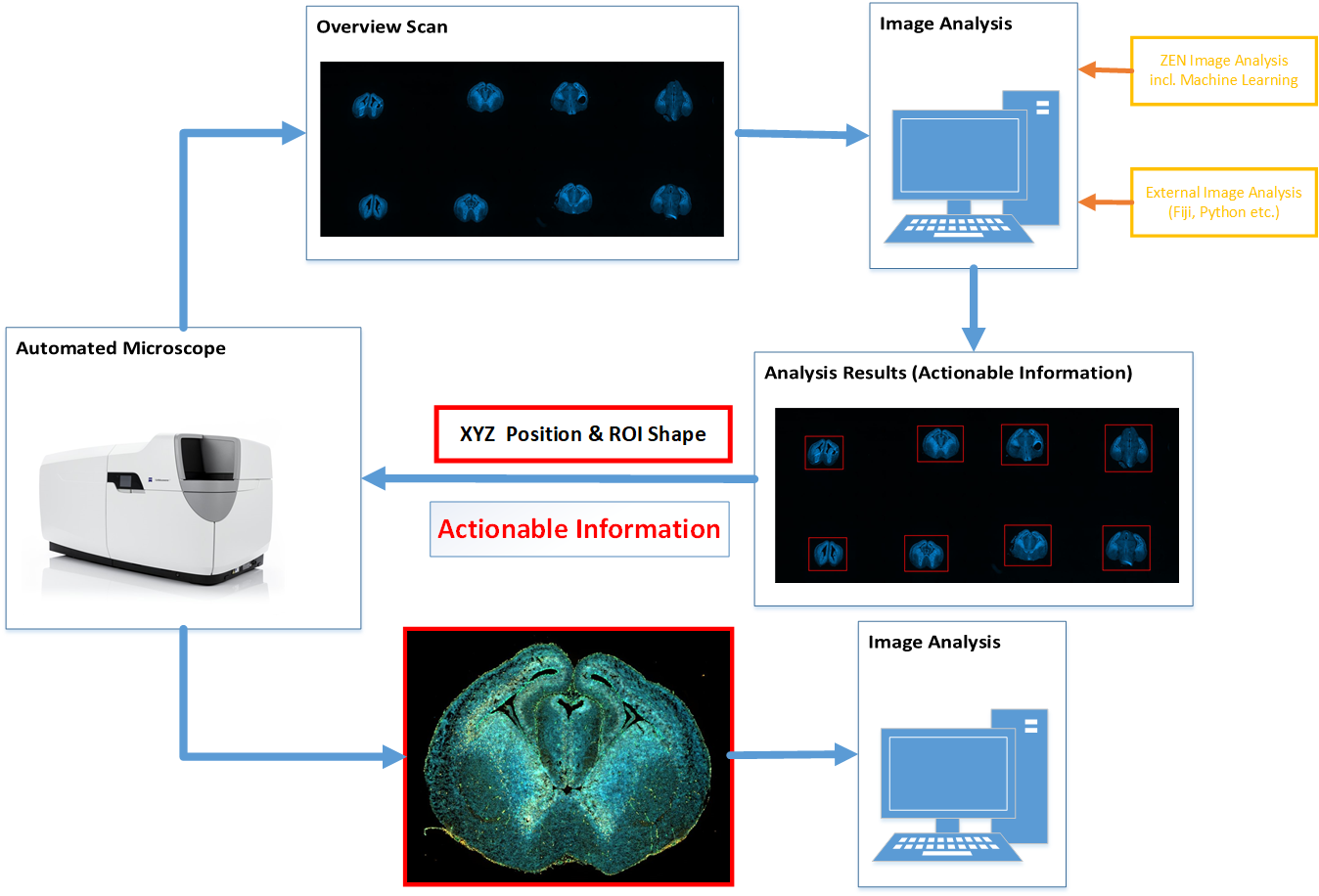
A macro implements the same pattern inside ZEN. Customize processing, target selection, experiment modification, and external analysis handoffs.
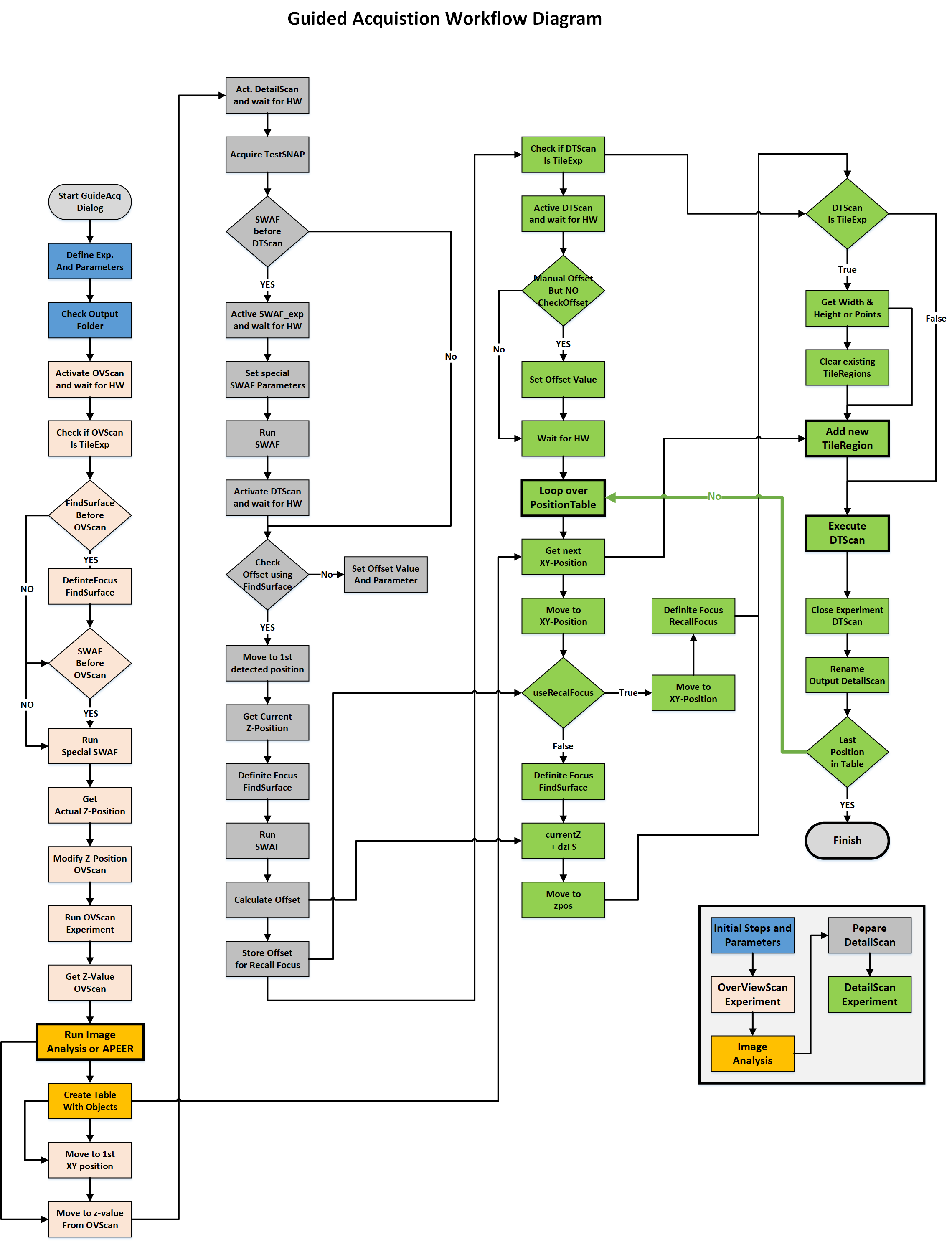
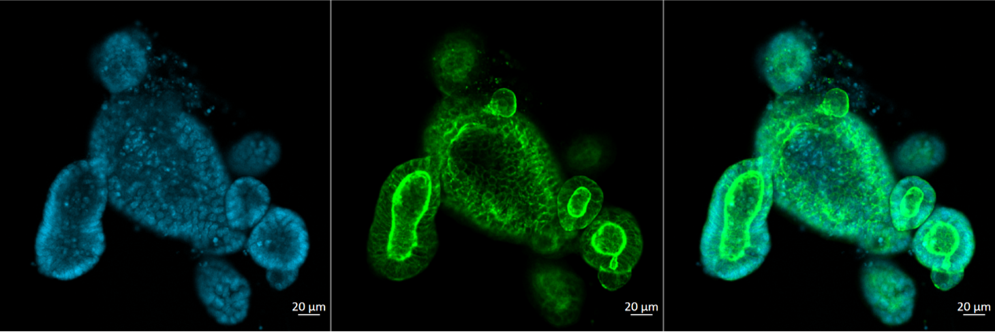
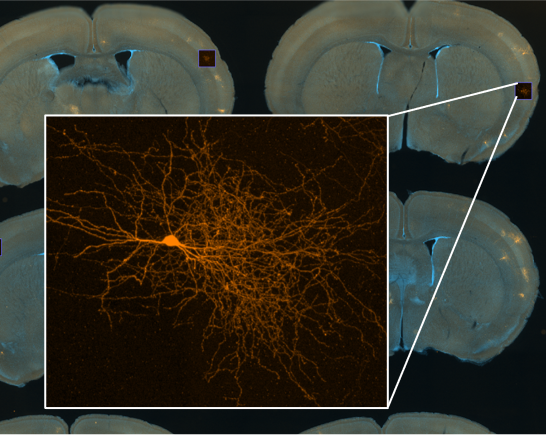
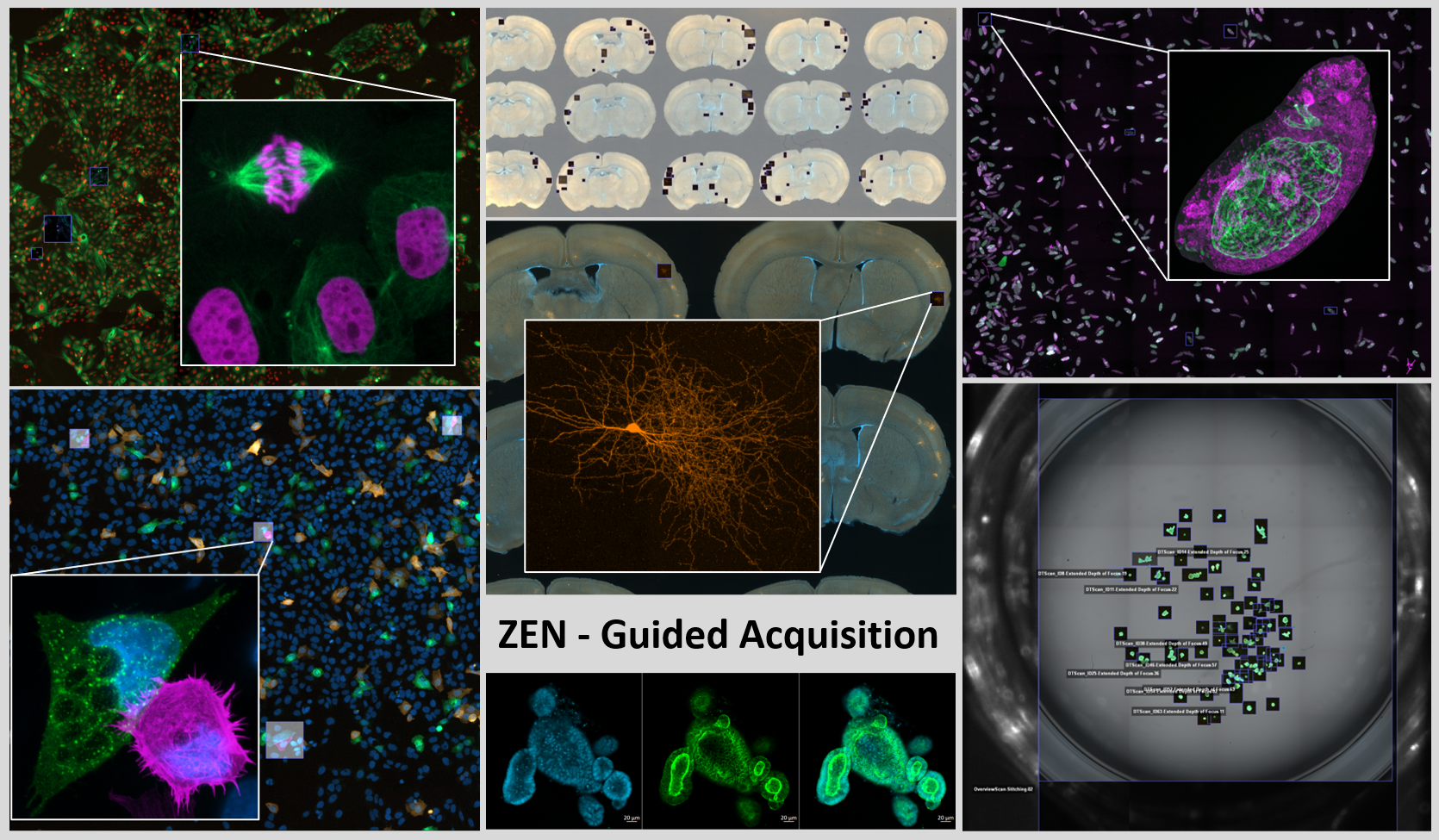
Basis: Guided Acquisition README and tutorials. “Module” and “script” describe the implementation and user experience, not two different biological selection principles.
A concrete event-driven workflow
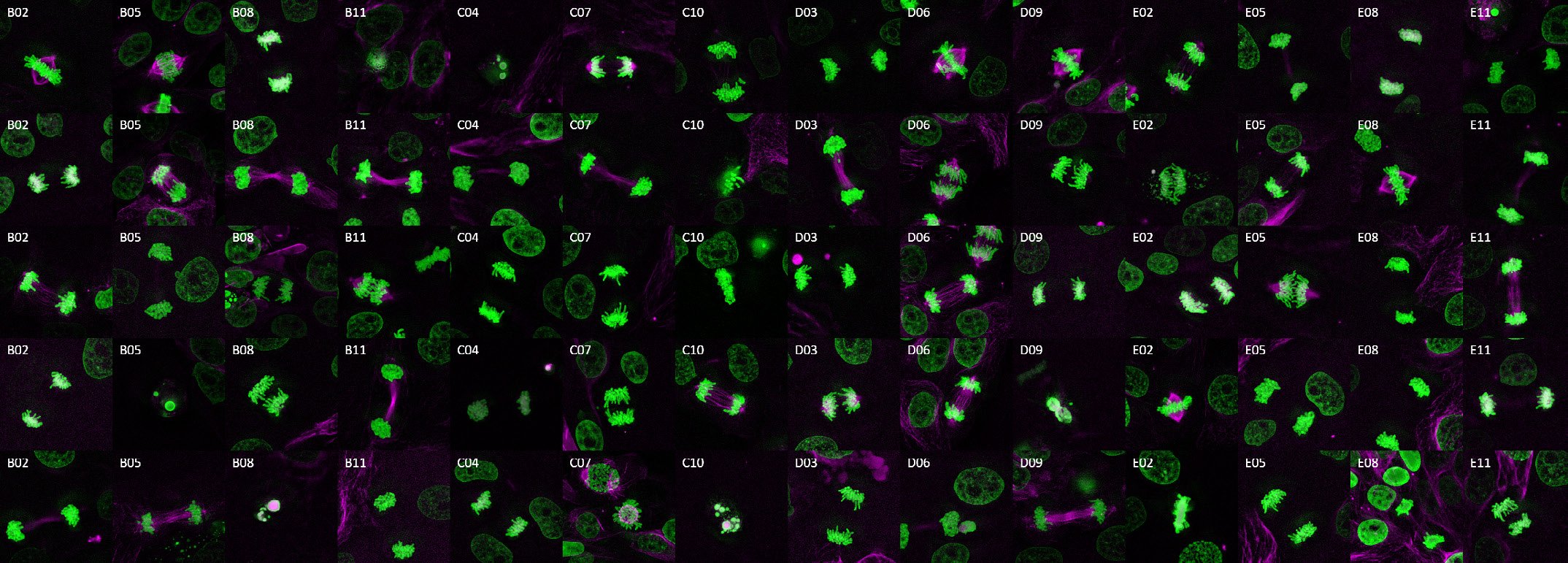
A useful recording must include the event's start, not only a bright cell found too late.
Sequential well processing reduces the delay between detection and detail. Classification errors and time spent acquiring each stack still limit useful throughput.
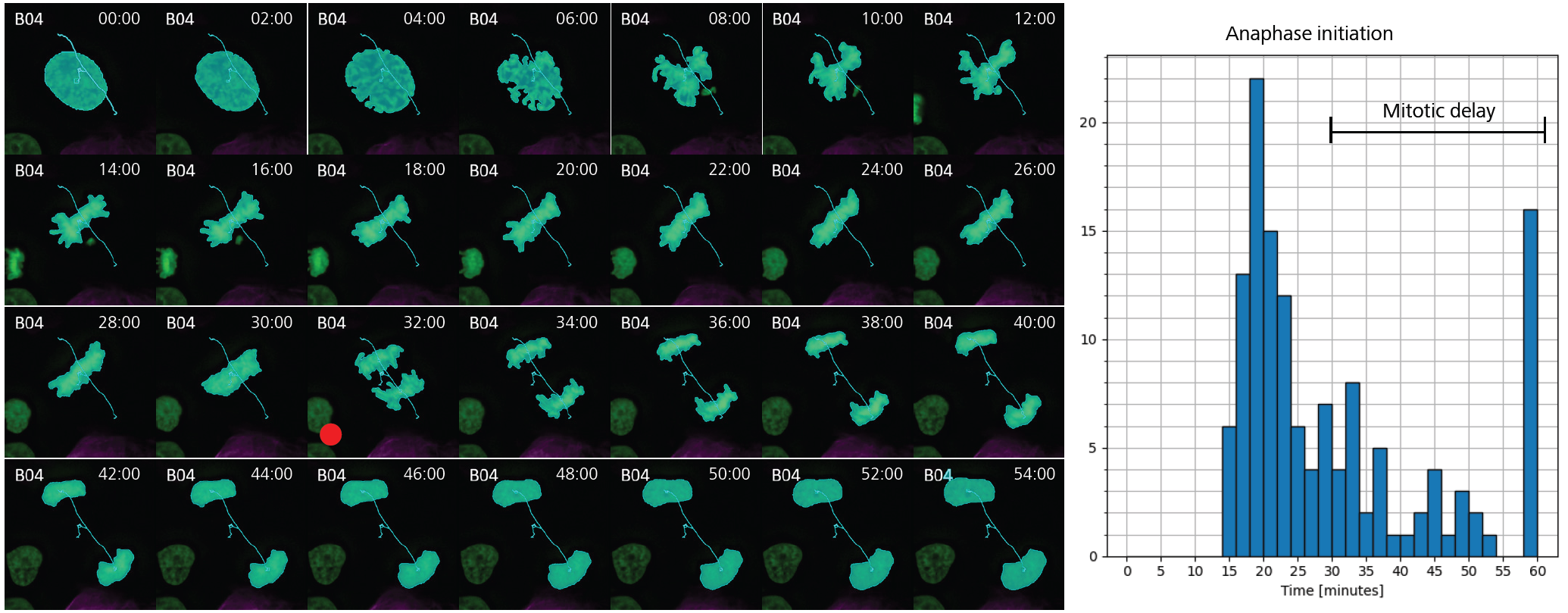
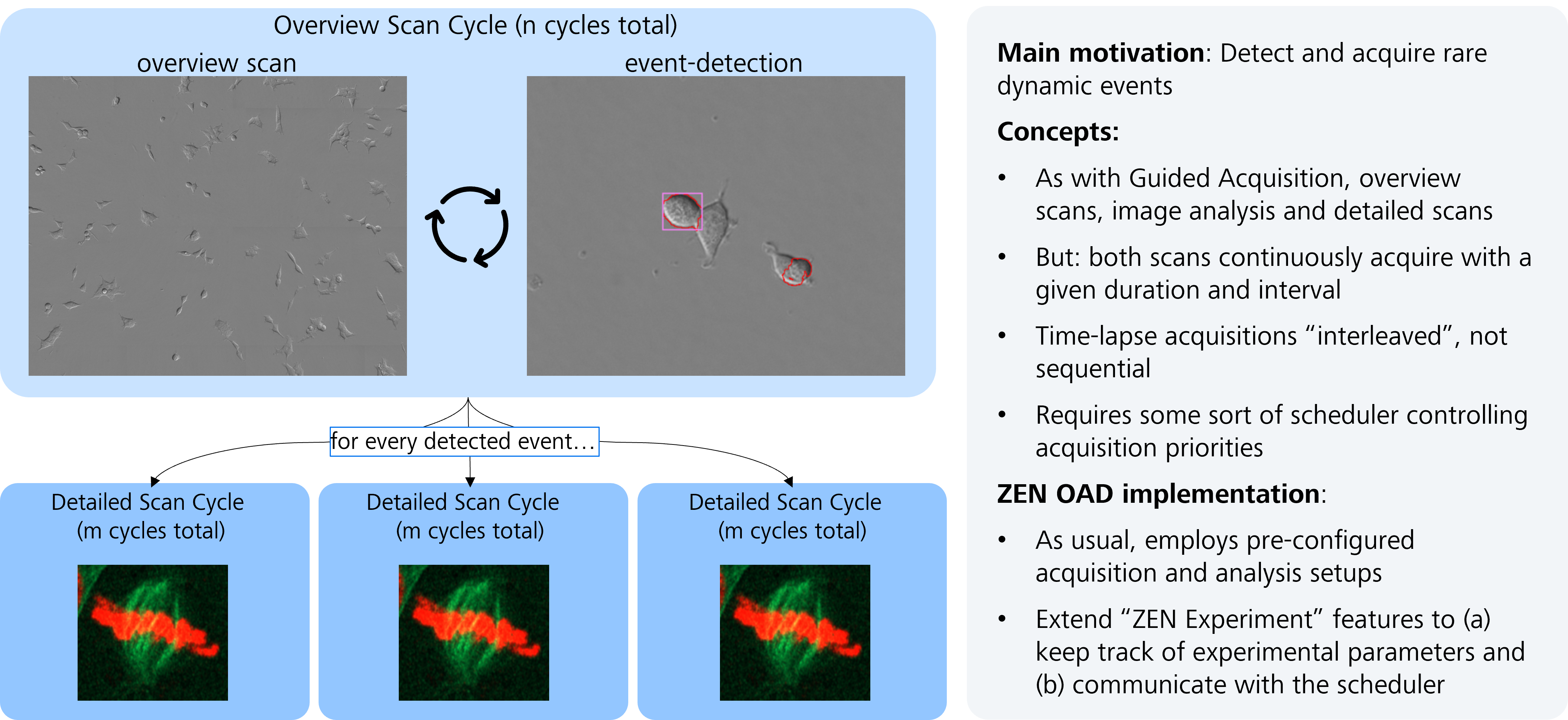
Case-study media: included images and recordings. Credits: ZEISS, Marion Lang, Sandra Orthaus, Phillip Seidel, Pierre Menard, and contributors. No general speed or detection guarantee is inferred.
ZEN-API deep dive / architecture
ZEN-API connects an external process to a running ZEN system. It exposes services, not mouse clicks.
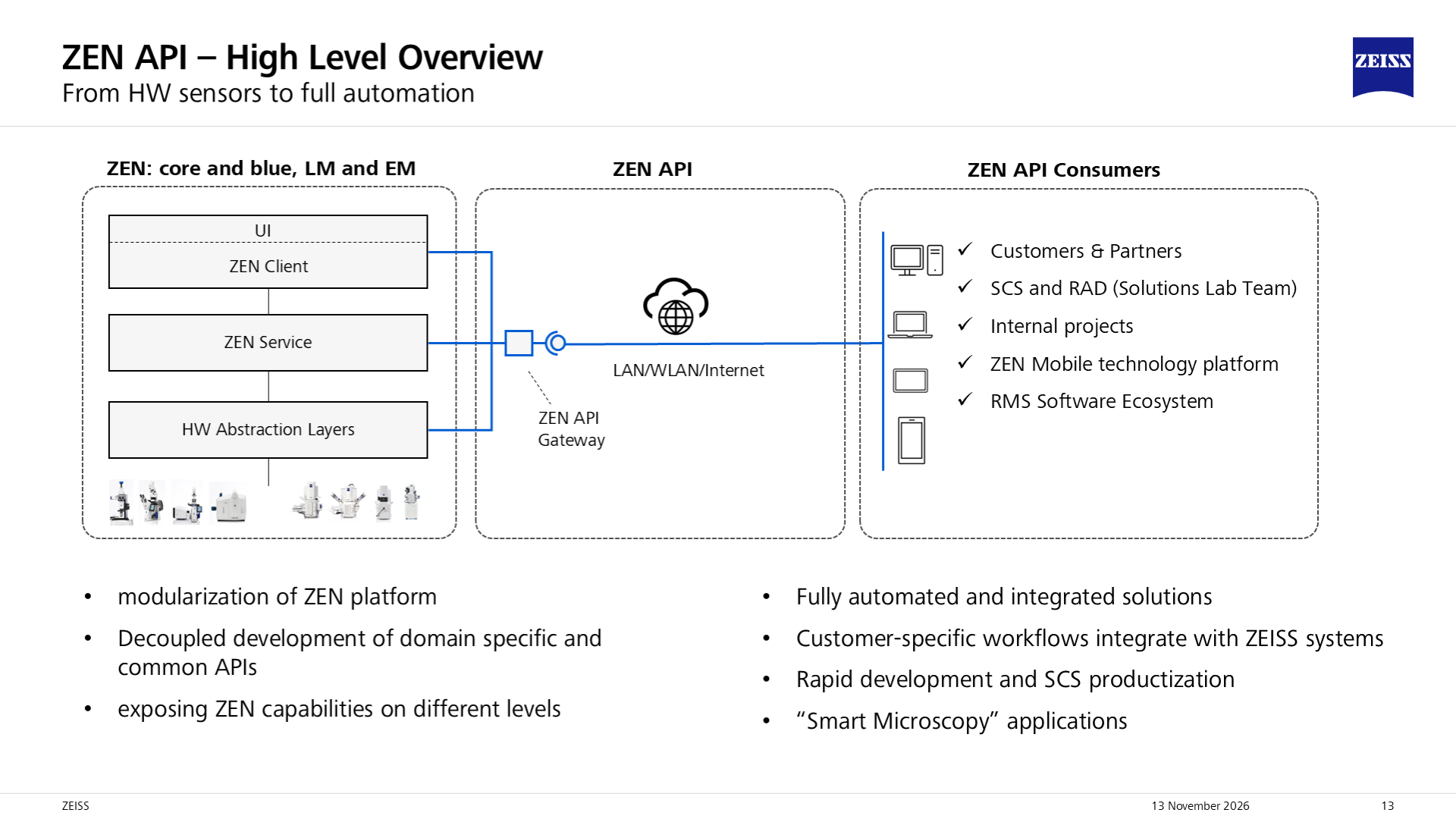
Your Python program or other application calls services, analyzes data, and chooses the next action. It can run locally or on another permitted machine.
A separate application routes calls to registered providers and handles shared concerns such as access management and aggregated service descriptions.
A running ZEN ecosystem application hosts an API server and registers its services. The provider implements the microscope-specific operation.
ZEN-API does not replace OAD or expose every internal ZEN function. It is not a UI-automation interface. Check that the exact operation exists for the running system before designing the workflow.
Basis: public ZEN-API overview, gateway, and glossary. LM means light microscopy; EM means electron microscopy. A shared acquisition concept does not imply identical hardware support.
ZEN-API deep dive / contracts
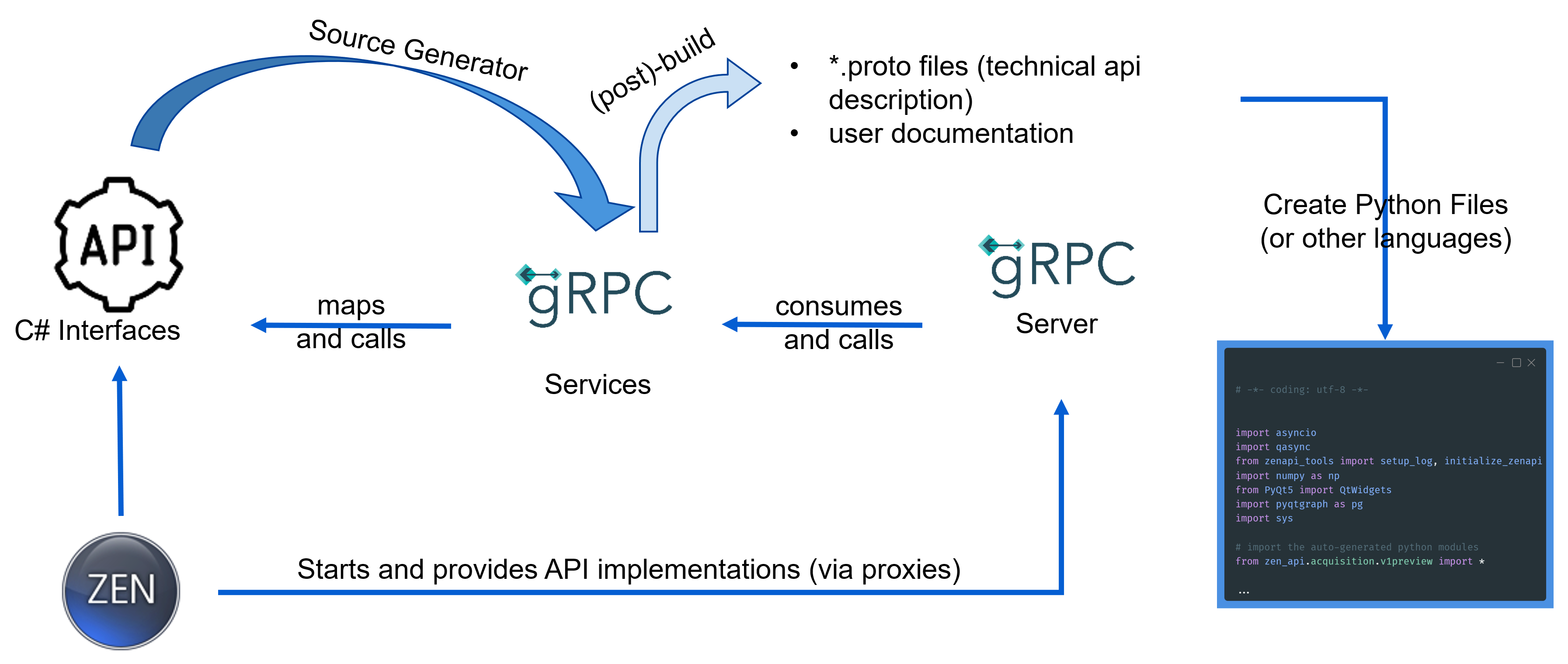
A .proto file defines services, request and response messages, and fields. It is the contract, not the microscope driver.
Remote Procedure Calls use HTTP/2 and Protocol Buffers. Methods can return a response or a stream of responses.
A stub makes a remote service callable from your program. Generated messages enforce the API's data structure; they do not supply unsupported server features.
zen_api supplies the generated API messages and gRPC client wrappers.zen_api_utils supplies separate, application-side connection and workflow helpers.Package version, service namespace, and server capabilities are separate concerns. Namespaces such as v1 and v1beta coexist in a package.
A method present in a generated package may still be unavailable on an older ZEN server or a different instrument.
Basis: contract-generation overview, utility package documentation, and versioned proto contracts.
ZEN-API deep dive / data during acquisition
| Keep with the pixels | Why it matters |
|---|---|
| Experiment ID and frame number | Associate a response with its experiment and frame; do not identify frames only by arrival time. |
| Frame position | Use the acquisition indices, such as time, Z, channel, tile, and scene, when organizing the data. |
| Stage position and scaling | Relate image measurements to physical locations. Verify coordinate frames, origins, and units. |
| Pixel type, full-frame size, and raw bytes | Decode the correct type and shape. A byte payload is not already a NumPy image. |
| Payload start position and size | Place partial data at the correct offset within the full frame. Do not reshape every response as a complete image. |
The reviewed service offers single-response methods such as GetNextFrame, optionally scoped to an experiment or channel.
MonitorExperiment and MonitorAllExperiments return server streams. Select the intended experiment and channel scope.
The monitor requests include enable_raw_data. Raw data can contain partial frames or lines; the non-raw mode assembles full frames.
Separate pixel reception, expensive analysis, and hardware decisions. Bound buffering, record processing lag, and define what happens when analysis is slower than acquisition. Do not claim hard real-time performance from a demo video.
Basis: ExperimentStreamingService, FrameData, and FramePixelData contracts; pixel-stream example. The concurrency guidance is a design recommendation, not an API delivery guarantee.
ZEN-API in an external viewer
Start acquisition in ZEN Blue and let napari display incoming frames. Connecting does not start an acquisition. The passive mode does not know the experiment ID in advance; run only one acquisition at a time.
Select a prepared experiment, then start it from napari. The plugin reads experiment dimensions from exported XML and filters frames by the returned experiment ID.
The OME-ZARR-only mode uses a dedicated channel and writer rather than the Display pipeline. It can start the experiment or arm the writer before a manual ZEN start.
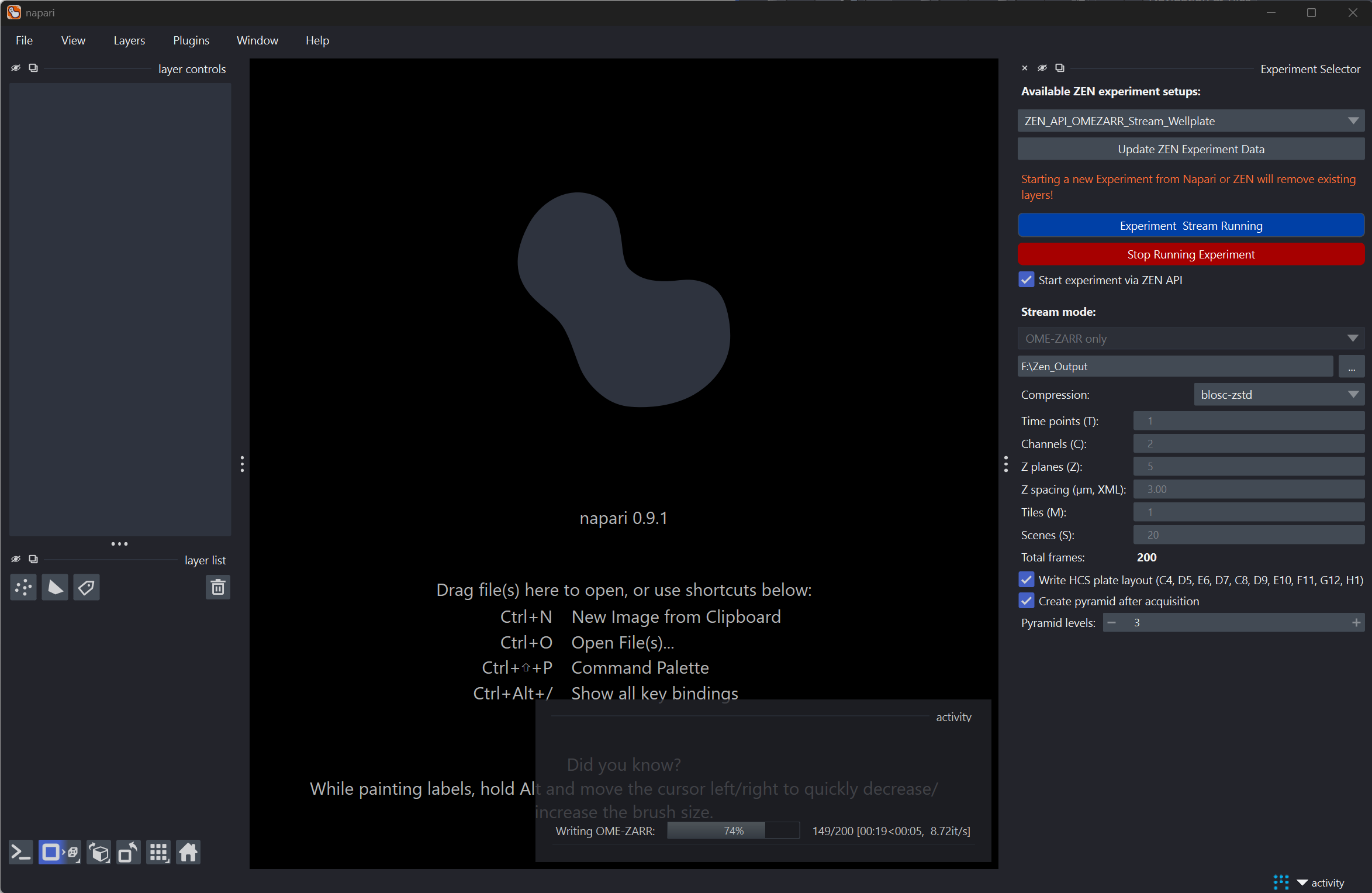
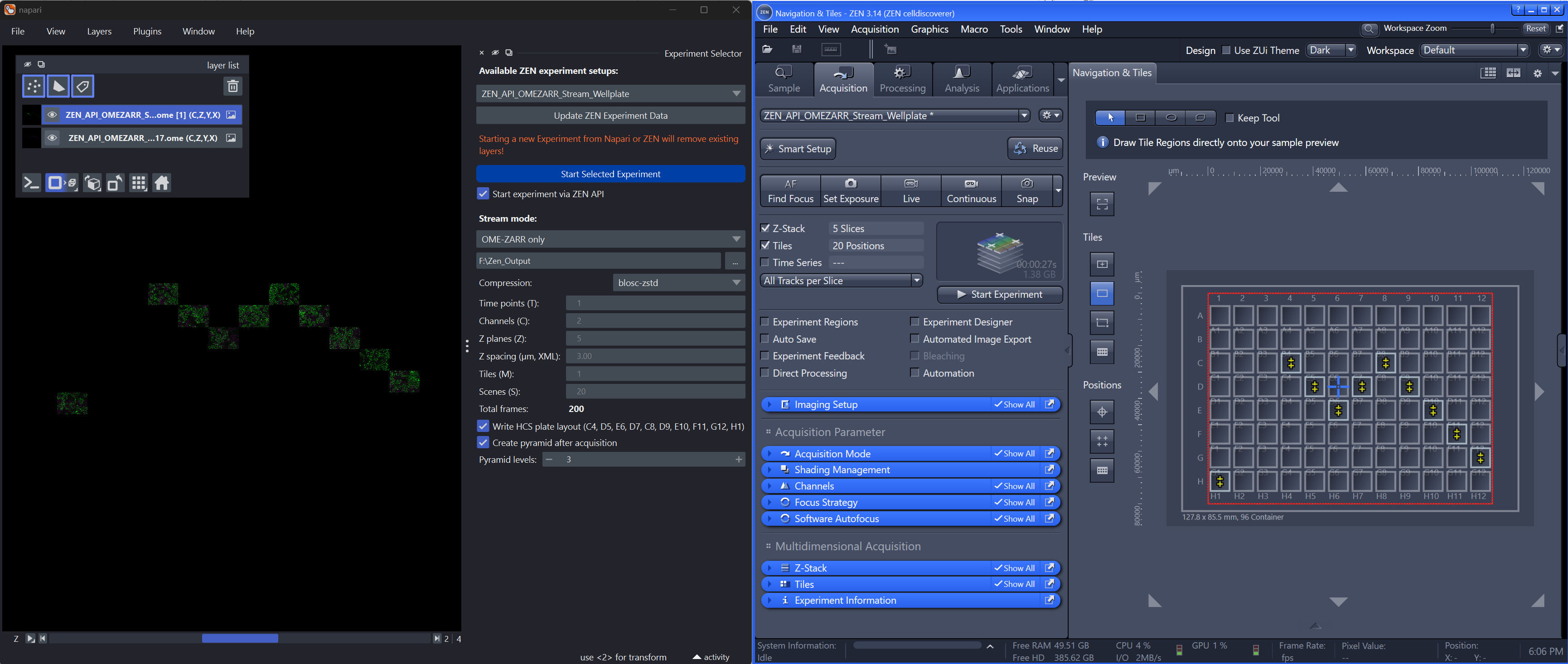
Display mode receives frames through an asynchronous reader, queue, and processor. It can show only the latest frame, but still retains received frames for final scene assembly.
After acquisition, tiles are placed using streamed positions into scene mosaics per channel. A lightweight live preview does not mean acquisition memory use stays constant.
The repository documents that final pixel payloads can arrive after ZEN reports acquisition complete. A napari-started Display run also waits for its expected unique frame count, with inactivity as a fallback.
The configured writer checks expected coordinates. Missing frames can leave a partial store and an error; inspect acquisition_status.json rather than assuming success.
The reviewed Display path assumes uint16 input and normalizes each frame for visualization. Do not compare its layer intensities as untouched acquisition values. The configured OME-Zarr writer preserves supported raw GRAY8 or GRAY16 intensities; it does not support color pixel types.
zen_api and zen_api_utils wheels in the same environment as napari. They are required dependencies, not implied downloads from PyPI.2026.5.1 through 2026.11.1. Match the gateway and instrument, not only the plugin.Use a CZI reader to explore existing data. Use the streaming plugin to receive pixels during acquisition. Add a validated decision and control action when the scientific question needs a closed loop.
Basis: repository README, runtime behavior, requirements, package metadata, and display normalization code; two supplied napari recordings. Repository authors: Krijn H. van der Steen and Sebastian Rhode. Recorded UI versions may differ from the current checkout.
Additional Applications using ZEN-API
The napari plugin above provides viewing and storage modes. These recordings also show separate custom Python clients. Do not infer that a function shown in one client is built into another.
Compare this receiving-only baseline with Videos E and F in the PixelStream section for segmentation and denoising, and Video J below for Guided Acquisition. Each demonstration is embedded once per document. The alternate recording of the same Guided Acquisition workflow remains linked, not embedded, in the recording collection. Media references, credits, and hashes are listed in the media manifest.
ZEN-API deep dive / building a smart workflow
The Python guided-acquisition example loads and clones experiments, clears tile regions, creates a rectangle, polygon, or ellipse, and runs a detailed acquisition.
Its tile-region calls document physical dimensions in meters. Do not pass segmentation pixel coordinates directly to stage or tile-region APIs.
The example also imports a legacy TCP/IP helper. Treat it as a mixed-interface example; do not assume every supporting operation is a pure ZEN-API call.
The external program sequences wells, focus, acquisition, file readiness, and analysis. The supplied CD7 example keeps hardware operations sequential while background analysis works on previous CZI files.
Use this when Python must own the complete process or coordinate other systems.
The API can run ZEN core jobs and modify supported workflow parameters. Consult the versioned API documentation for available services.
A ZEN core job and an acquisition experiment are distinct concepts. Verify available workflow services for that edition.
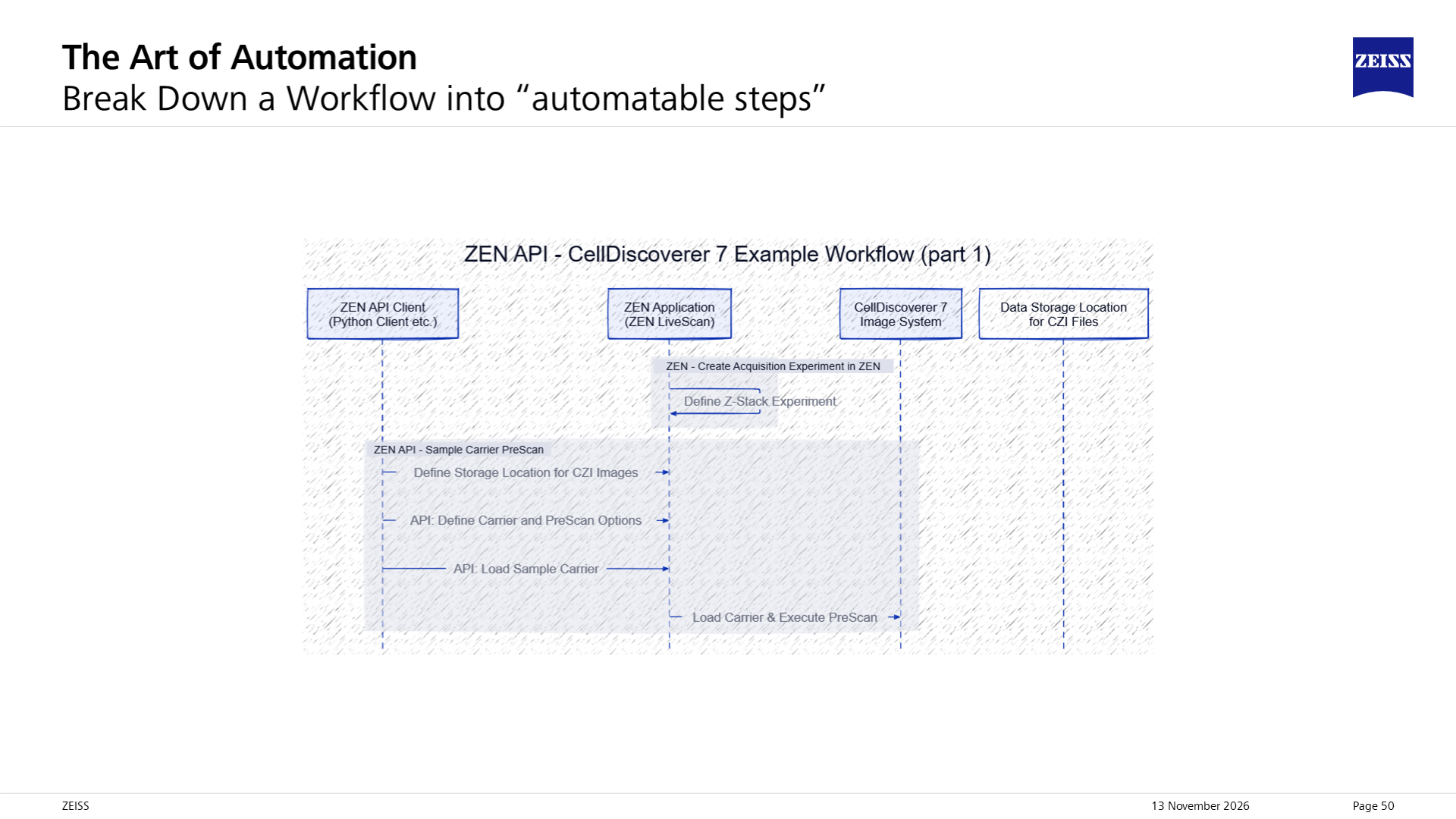
Avoid replacing a stable experiment with many low-level hardware calls when one supported acquisition block will do. More external flexibility can add coordination and processing overhead.
Analysis, denoising, or a dashboard alone is monitoring. A smart feedback workflow also has an explicit rule, a supported control action, and a checked result.
Basis: repository control examples and public OAD Python workflows; included workflow-block illustration. Sample loading and carrier navigation are instrument-specific, not generic promises for every ZEN installation.
Workshop examples
These four example collections cover the steps around a smart acquisition. Image reading, model inference, and assay analysis do not control the microscope unless connected to an explicit acquisition decision.
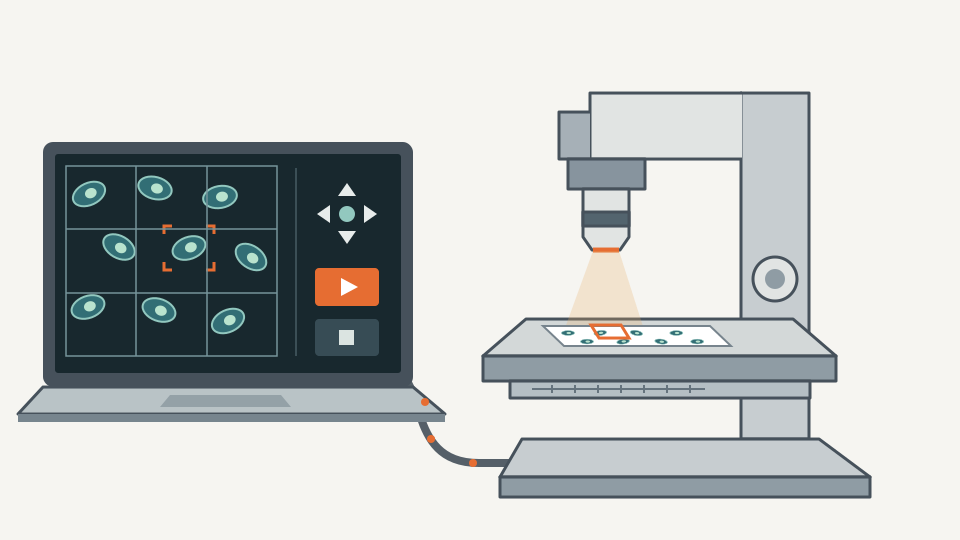
Explore stage and focus control, optical changers, autofocus, acquisition positions, tile regions, and Z-stacks. Continue with status monitoring, live processing, OME-Zarr streaming, or overview-driven guided acquisition.
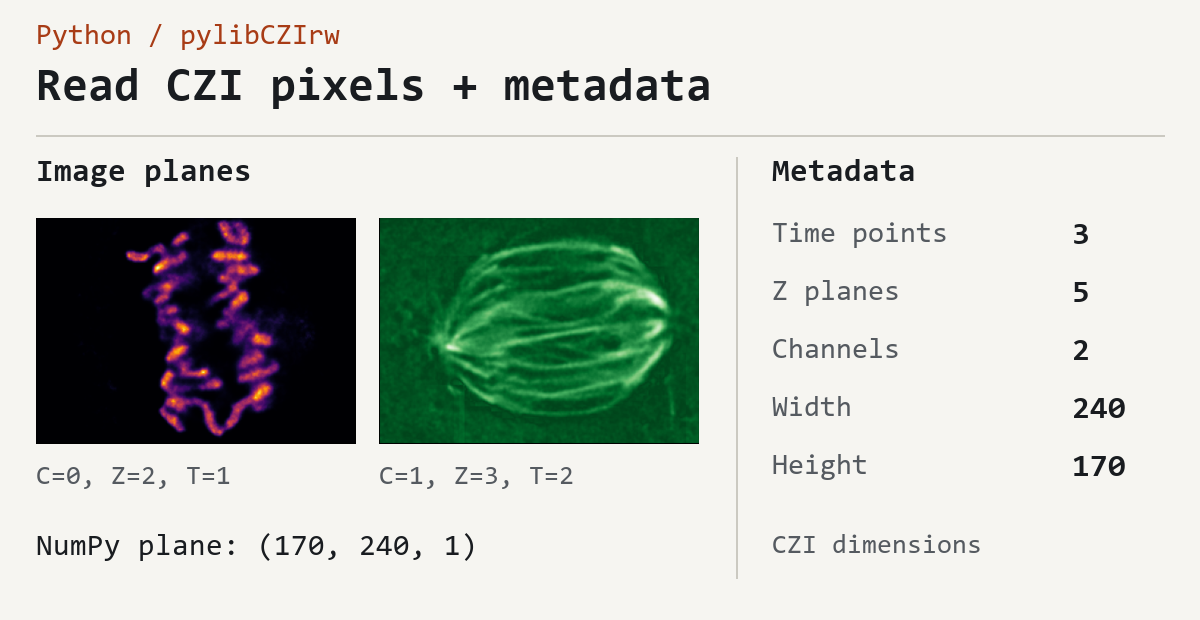
Inspect metadata, pixels, scenes, well plates, and attachment images. Try lazy viewing, CZI writing, OME-Zarr export, and reference-backed VZIP access. VZIP still requires the unchanged original CZI.
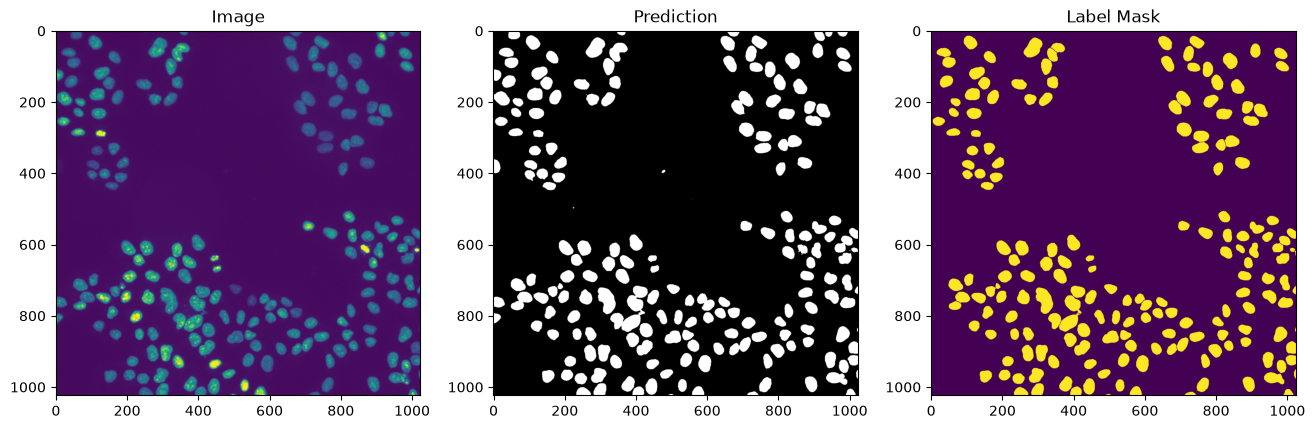
Inspect CZANN metadata, unpack an ONNX model, and run inference with ONNX Runtime. A separate teaching notebook trains a small PyTorch nuclei-segmentation model and exports CZANN; preprocessing must match the selected model.
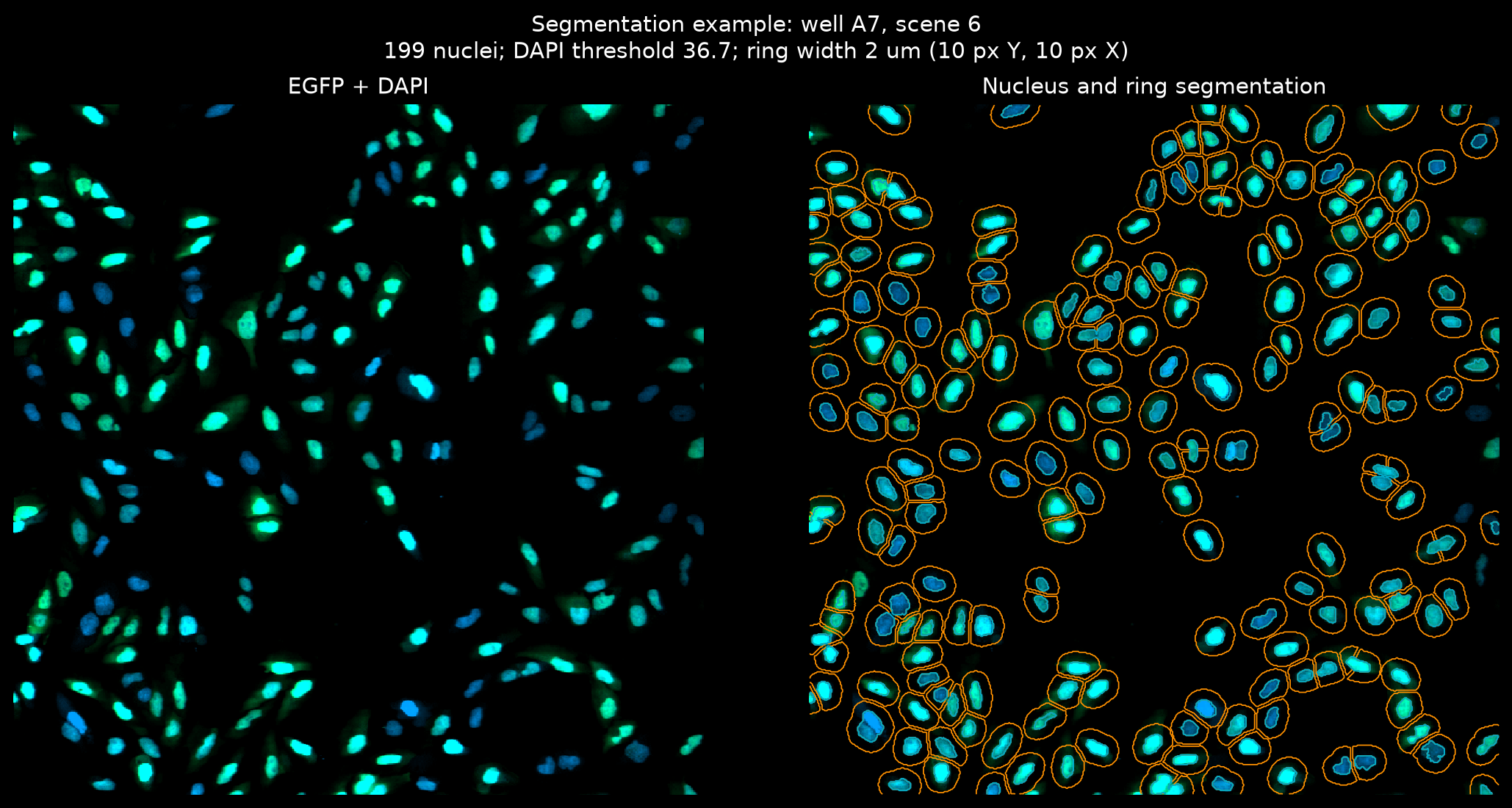
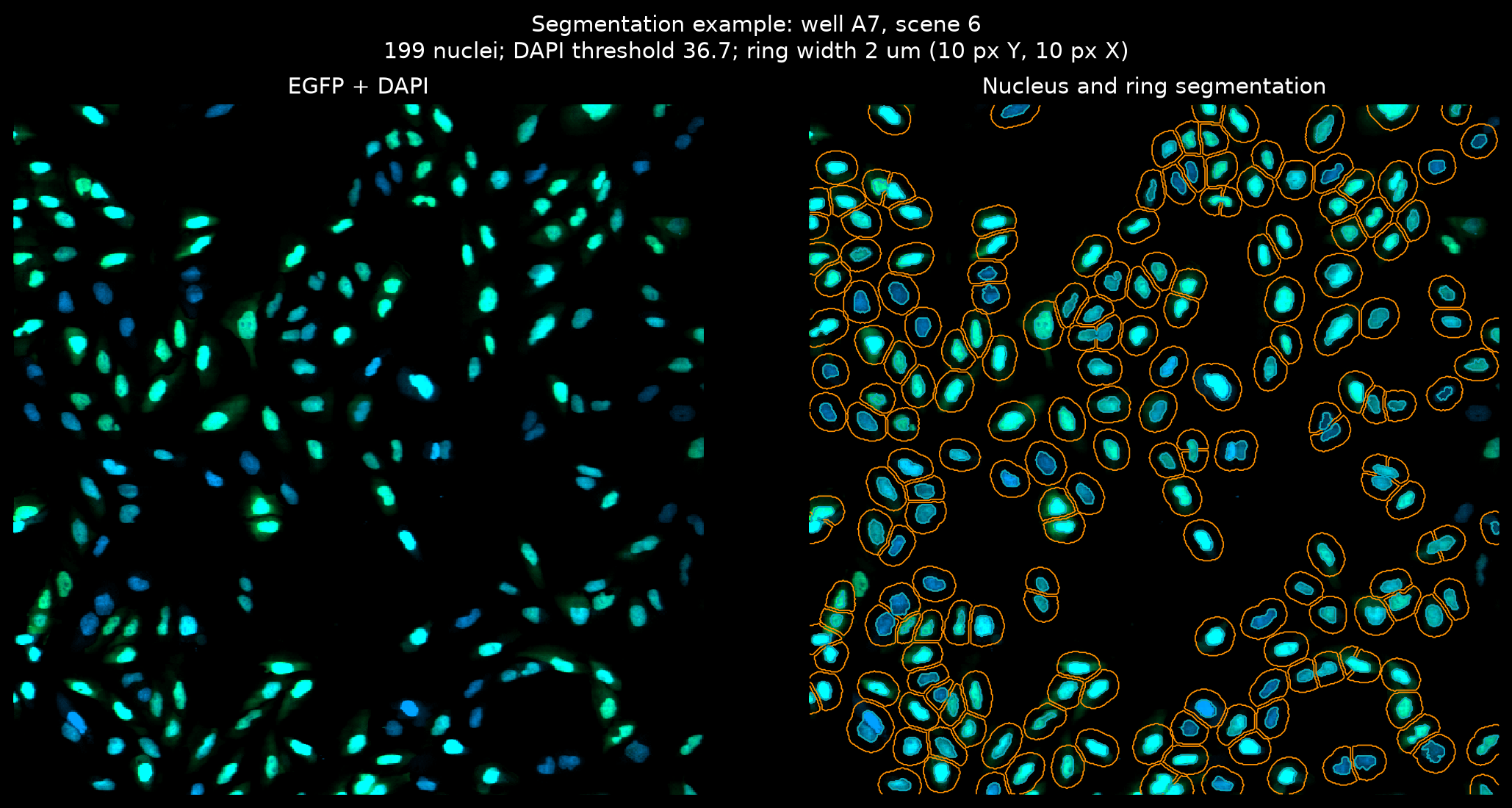
The translocation assay segments DAPI nuclei and measures nuclear-to-cytoplasmic EGFP signal. It reads CZI or OME-Zarr plate data, then exports cell measurements, well summaries, heatmaps, and dose-response fits.
Translocation assay: example and inputs · Illustrated assay walkthrough
These are educational examples. Review each README, input data, model assumptions, and output paths. Validate hardware coordinates and use the instrument's approved procedures before running control scripts.
Links and additional info
The links below point to online resources or files included in this repository. Full-resolution illustrations and videos are included with this page. Videos play only when requested; no microscope code runs from this page.
Included interface map; OAD illustration; feedback workflow; feedback editor; public OAD repository.
Interface and workflow illustrations credited to Sebastian Rhode, ZEISS.
README and examples; ZEN 3.14 tutorial PDF.
Adaptive Acquisition Engine, observables, actions, script lifecycle, and synchronization.
README, tutorials, and scripts.
Module and scripted workflows, external analysis, requirements, and biological examples.
Event-driven OAD use case, simulation data, acquisition settings, and analysis settings.
ZEN-API README; ZEN 3.14 documentation, API 2026.5.1.
Architecture, installation, compatibility, gateway configuration, and troubleshooting. Match the documentation to the target ZEN system.
Experiment Feedback recording.
ZEISS Smart Microscopy demonstration, credited to Sebastian Rhode, ZEISS.
Overview; target detection; detail images; acquisition mosaic; biological readout; prometaphase recording; event-centered montage.
Included ZEISS case-study media. Sample and contributor acknowledgements accompany the relevant figures.
Gateway and provider architecture; workflow blocks.
Illustrations credited to Sebastian Rhode, ZEISS. Current service behavior is defined by the versioned API documentation.
Connection and workflow helpers; utility versions are independent from generated API versions.
Reviewed 2026.11.1 acquisition contracts; 2026.5.1 protocol reference for ZEN 3.14.
Service methods, requests, frame metadata, and pixel payload definitions. The newer reviewed contracts are not a promise of availability in ZEN 3.14.
Workshop control and streaming examples; OAD Python examples.
Guided acquisition, experiment configuration, streaming, coordinate handling, and client-side orchestration.
Viewing and storage modes, mosaics, completeness handling, and compatibility. Authors: Krijn H. van der Steen, UMC Utrecht, and Sebastian Rhode, ZEISS.
napari streaming; CZI viewing; Guided Acquisition (embedded); alternate recording of the same Guided Acquisition workflow (link only); PixelStream baseline; Noise2Void; semantic segmentation.
Both documents embed each distinct demonstration once using repository-local media. The alternate Guided Acquisition recording is retained here without a second player. Recorded interfaces do not establish current support or performance guarantees.
Included media retains its ZEISS/workshop and sample-contributor credits. Inclusion here does not grant additional publication or redistribution rights.
Built as a local visual explainer. No remote AI service, analytics, or CDN media is required. This is an educational overview, not a product specification or a substitute for the target system's documentation.