ZEISS

ZEISS ZEN / Smart Microscopy / November 2026

From image to action.

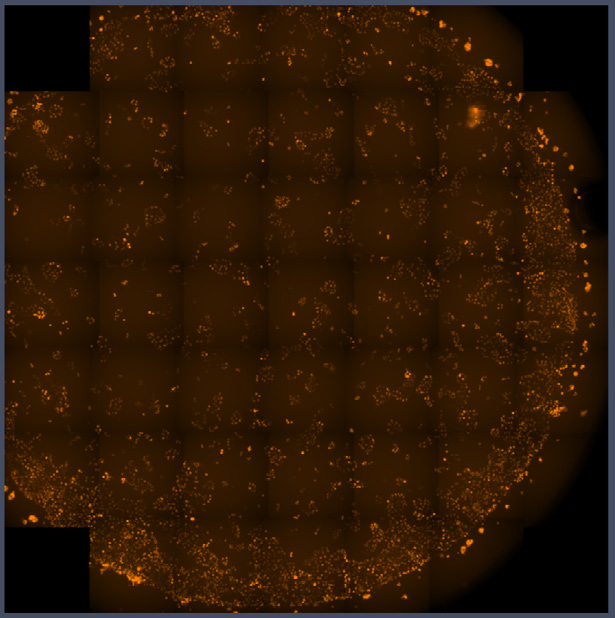
Low-magnification overview showing many cells across a wellObserve
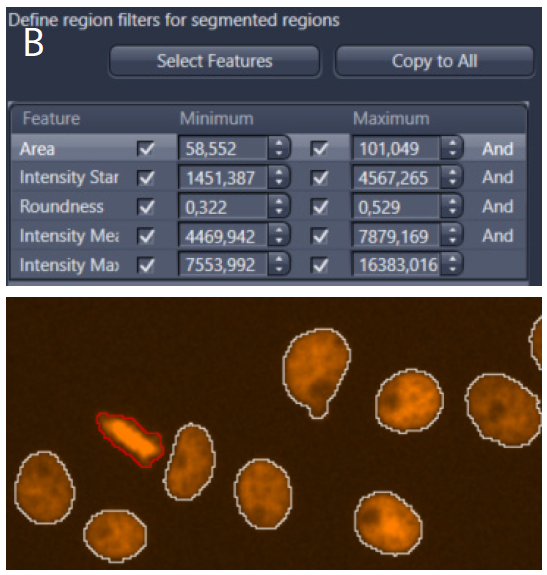
Region-feature filters identify candidate mitotic cellsDetect
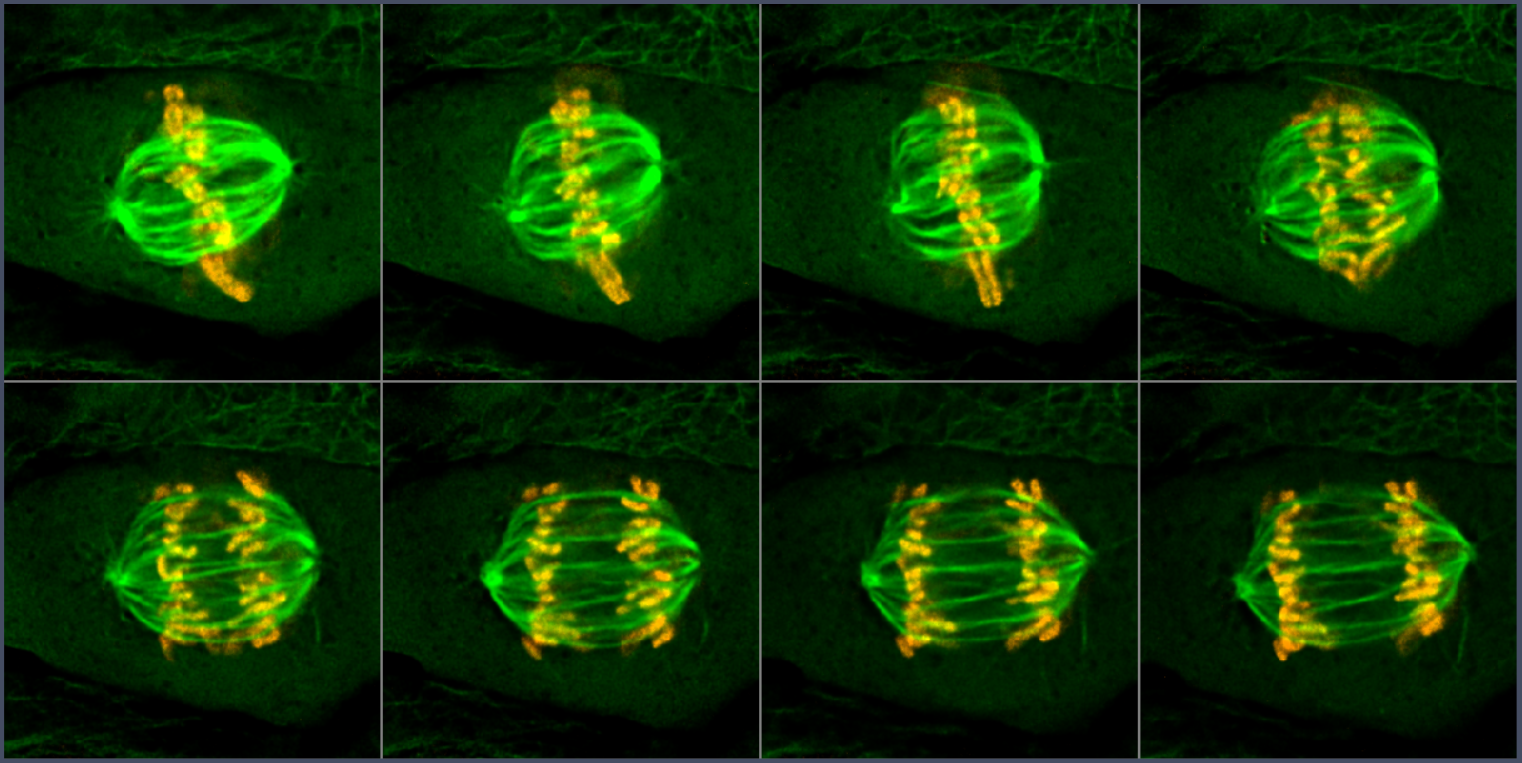
Detailed images show chromosome and spindle changes during mitosisAcquire
Sample information decides what ZEN acquires next. Source

Observe. Detect. Acquire selectively.

Arrow keys: navigate / O: outline / ?: help / F11: browser fullscreen

Choose a route

Put the decision where it belongs.

OAD

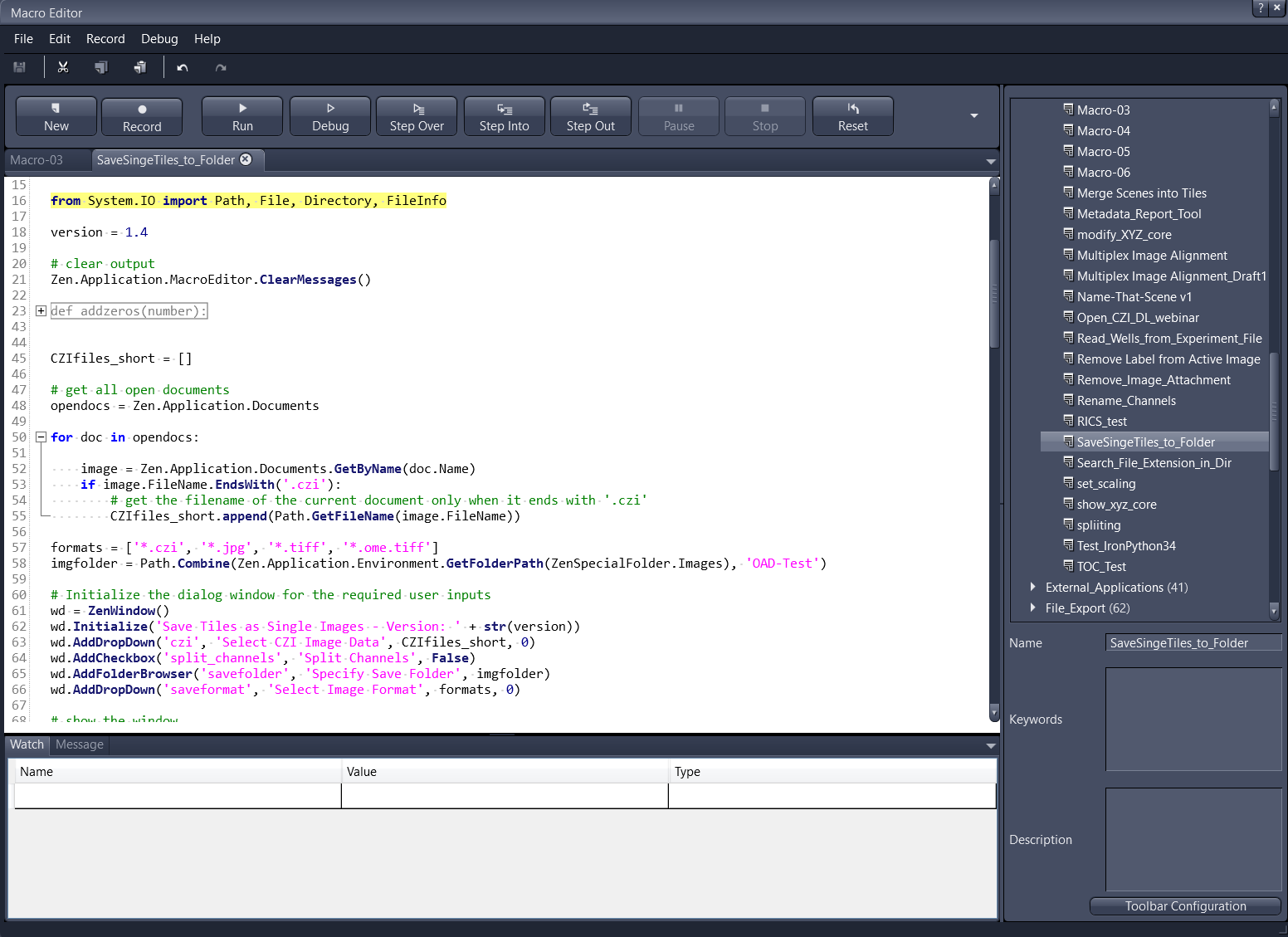
ZEN's internal script editor contains custom Python acquisition code
ZEN hosts your custom script. Source

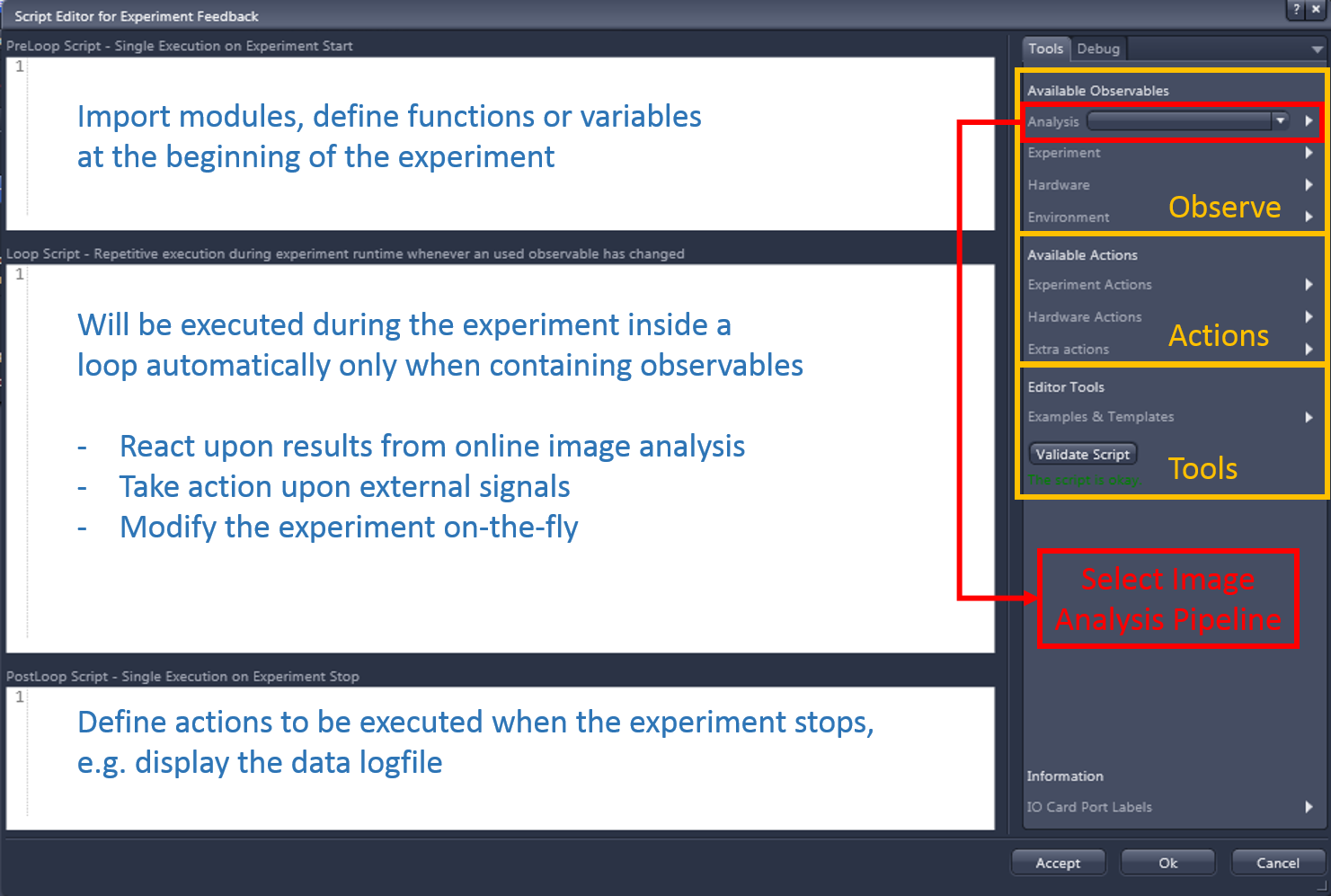
Experiment Feedback

Experiment Feedback editor combines observable measurements with acquisition actions
Rules adapt a running experiment. Source

Guided Acquisition

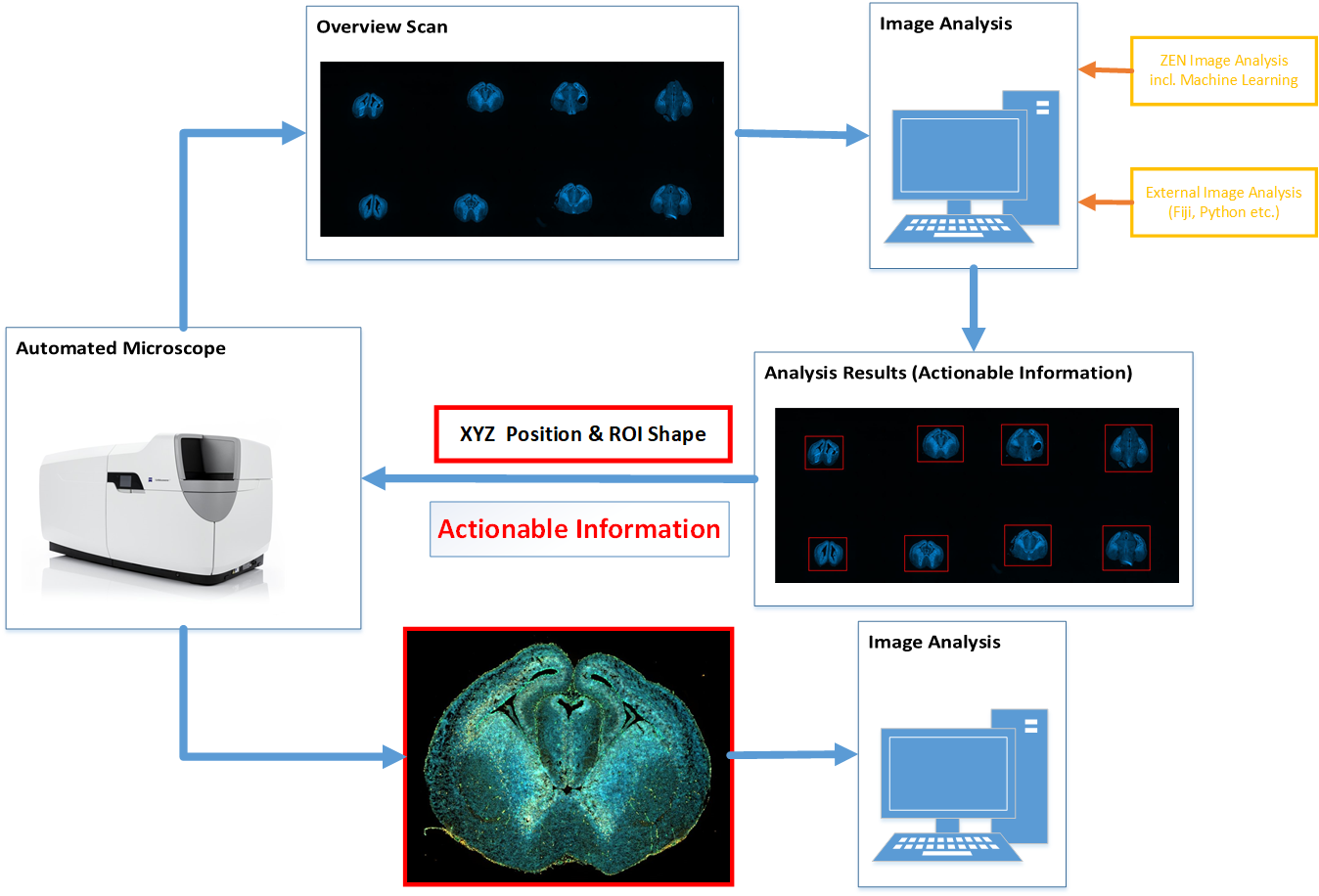
Low-magnification overview screens many cellsDetailed images record selected mitotic cells
Overview images select detail scans. Source

ZEN-API

An external computer selects image targets and controls a connected microscope
Your app controls ZEN. Source

These routes complement each other. Start with the built-in module when it fits.

Interfaces

Reading data is not controlling a microscope.

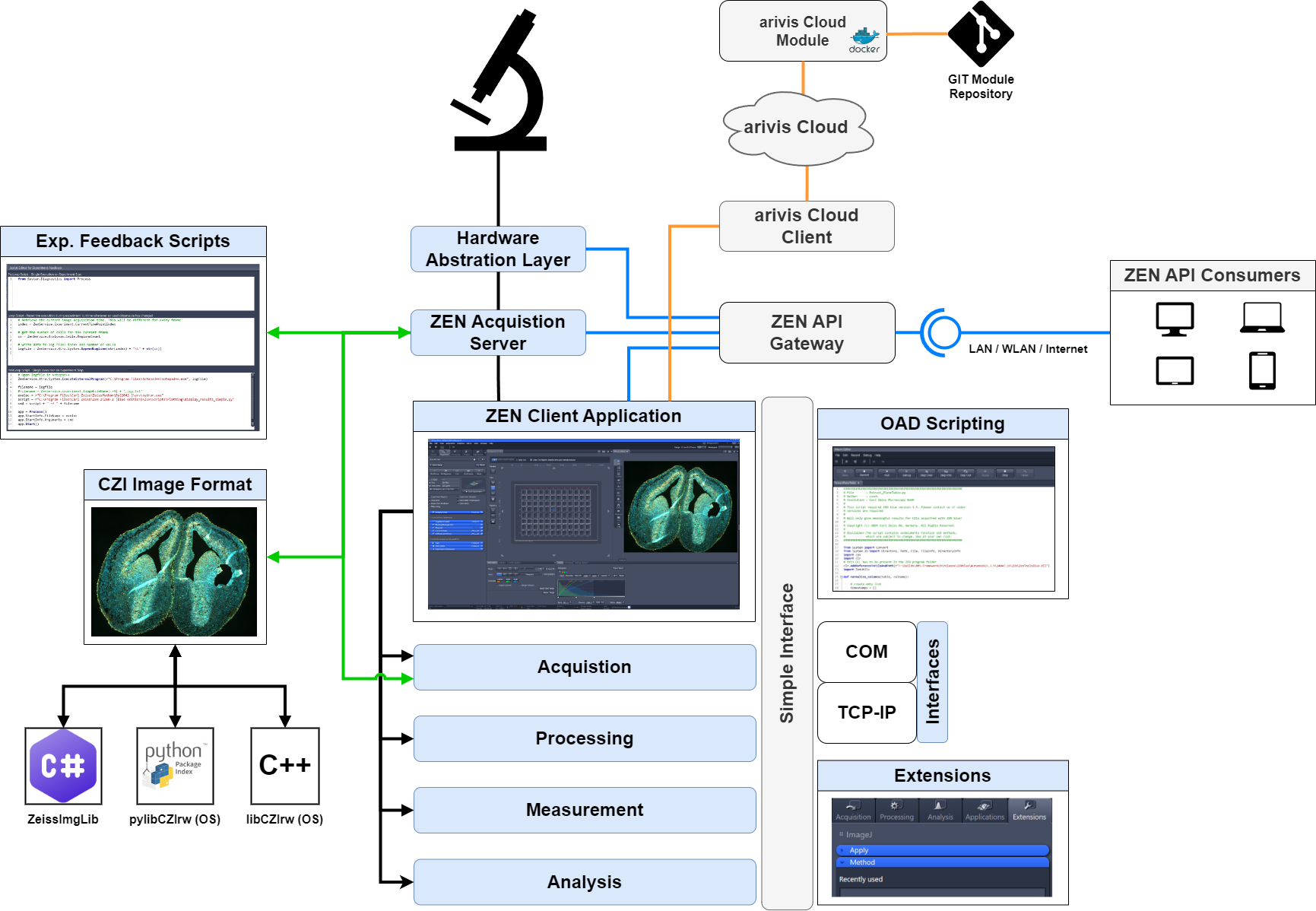
Source illustration places OAD, Experiment Feedback, ZEN API, COM, TCP/IP, extensions, and CZI access around ZEN
ZEN offers distinct data, scripting, extension, and service interfaces. Source
  • CZI: pixels + metadata.
  • OAD / Feedback: inside ZEN.
  • COM / TCP-IP: scripting.
  • C# extensions: ZEN plug-ins.
  • ZEN-API: typed services.

TCP/IP scripting is not gRPC ZEN-API. Availability depends on edition, license, version, and instrument.

Open Application Development

OAD makes ZEN the workflow host.

ZEN internal script editor with Python code and output panel
Record supported operations; edit scripts for acquisition, processing, analysis, and saving. Source
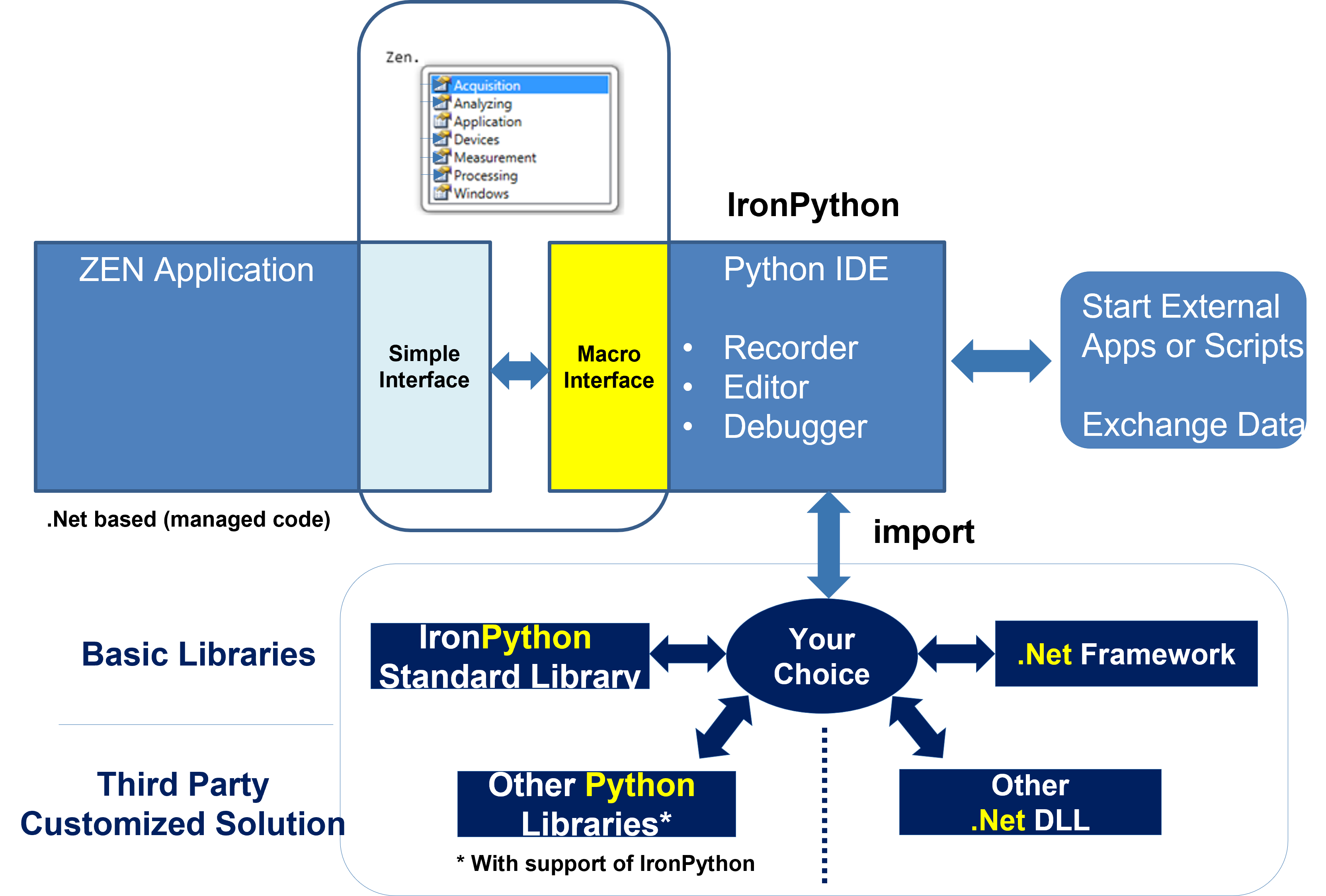
Source diagram distinguishes the internal IronPython environment from external Python and .NET libraries
Internal IronPython and external CPython remain separate runtimes. Source

Broad internal access; not every UI action is recordable. NumPy/SciPy need an external process and data handoff.

Experiment Feedback / lifecycle

Prepare once. React to changes. Finish once.

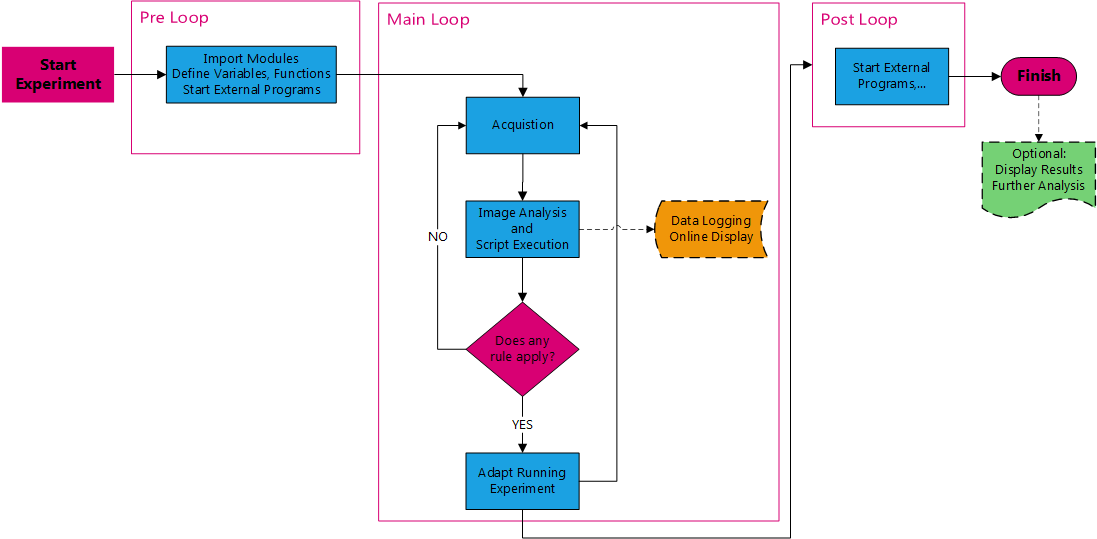
Original Experiment Feedback workflow with Pre Loop, Main Loop, and Post Loop
PreLoop initializes; Loop handles observable changes; PostLoop records results or starts follow-up work. Source

Loop is event-driven, not an unconditional polling loop.

Experiment Feedback / rules

Use the right result at the right time.

Experiment Feedback editor showing the three script areas and observable/action lists
The experiment stores setup, event-dependent logic, and final actions. Source
  • Read measurements or hardware state.
  • Stop, adjust, log, or call external software.
  • Wait for analysis results or files on disk.
  • Define measurements; reload changed settings.

Free Run / Synchronized execution and script cost affect acquisition timing.

Experiment Feedback / demonstration

Watch a rule act during acquisition.

Experiment Feedback demonstration; not a timing guarantee. Source

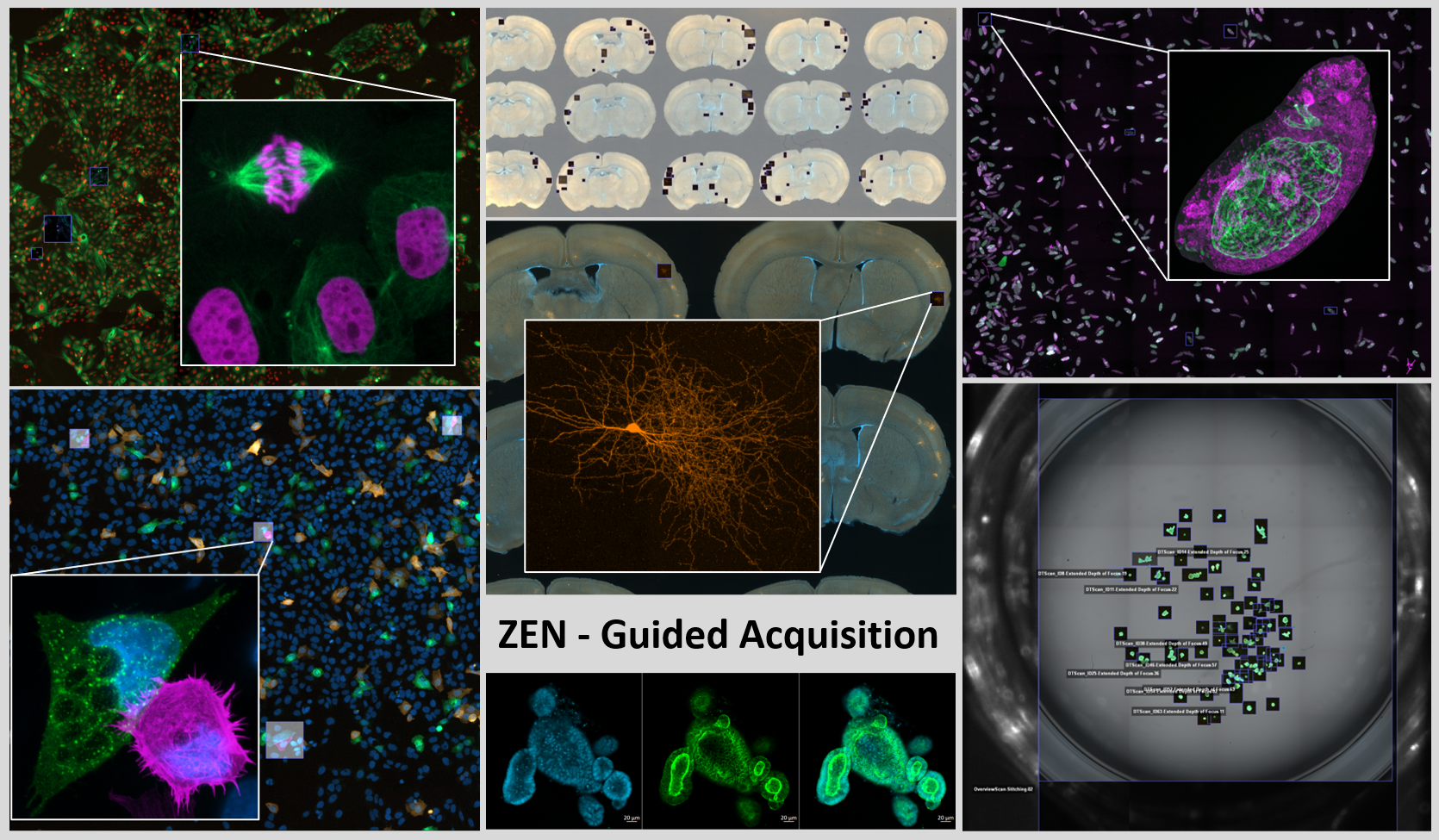
Guided Acquisition

Spend detail on selected objects.

Wide-field overview contains many candidate cellsObserve
Image-analysis feature filters select candidate mitotic cellsDetect
Detailed images show selected cells during mitosisAcquire
An overview becomes a target list, then selected detail scans; analysis can be internal or external. Source

One workflow pattern. Module, script, or external client.

Guided Acquisition / module

Configure the standard workflow without scripting.

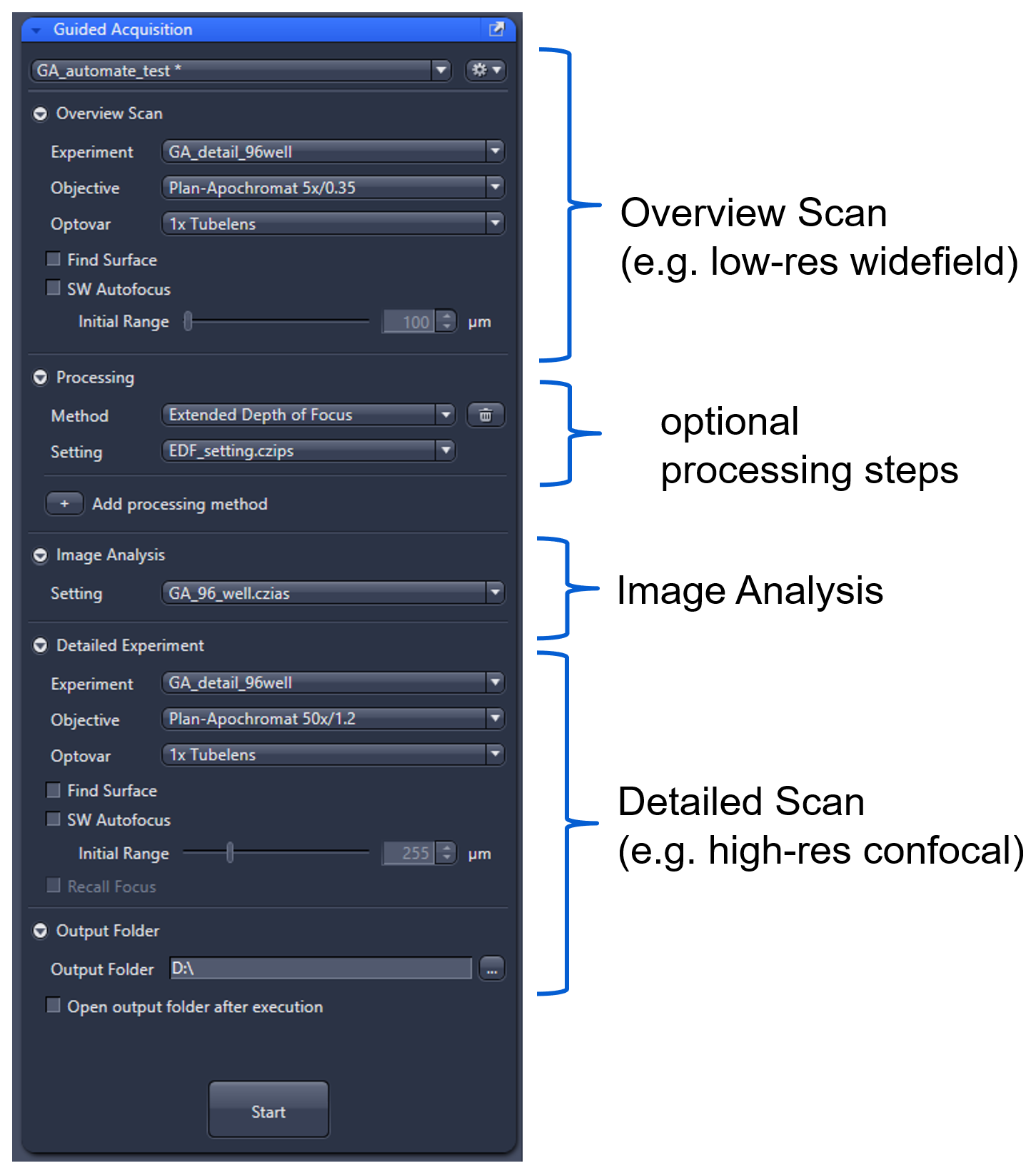
Guided Acquisition module with overview, processing, image analysis and detail scan settings Overview scans of brain sections feed internal or external analysis; detected XYZ positions and ROI shapes guide detailed imaging
Overview and detail recipes share processing, detection, XYZ positions, and region shapes. Source

Supports analysis checks and well plates. Confirm module entitlement and instrument support.

Guided Acquisition / object detection

Choose how to find the targets.

Check ZEN version, analysis features, and model compatibility. External inference needs integration; pixel classification is not necessarily deep learning.

Guided Acquisition / OAD script

Customize the guided sequence.

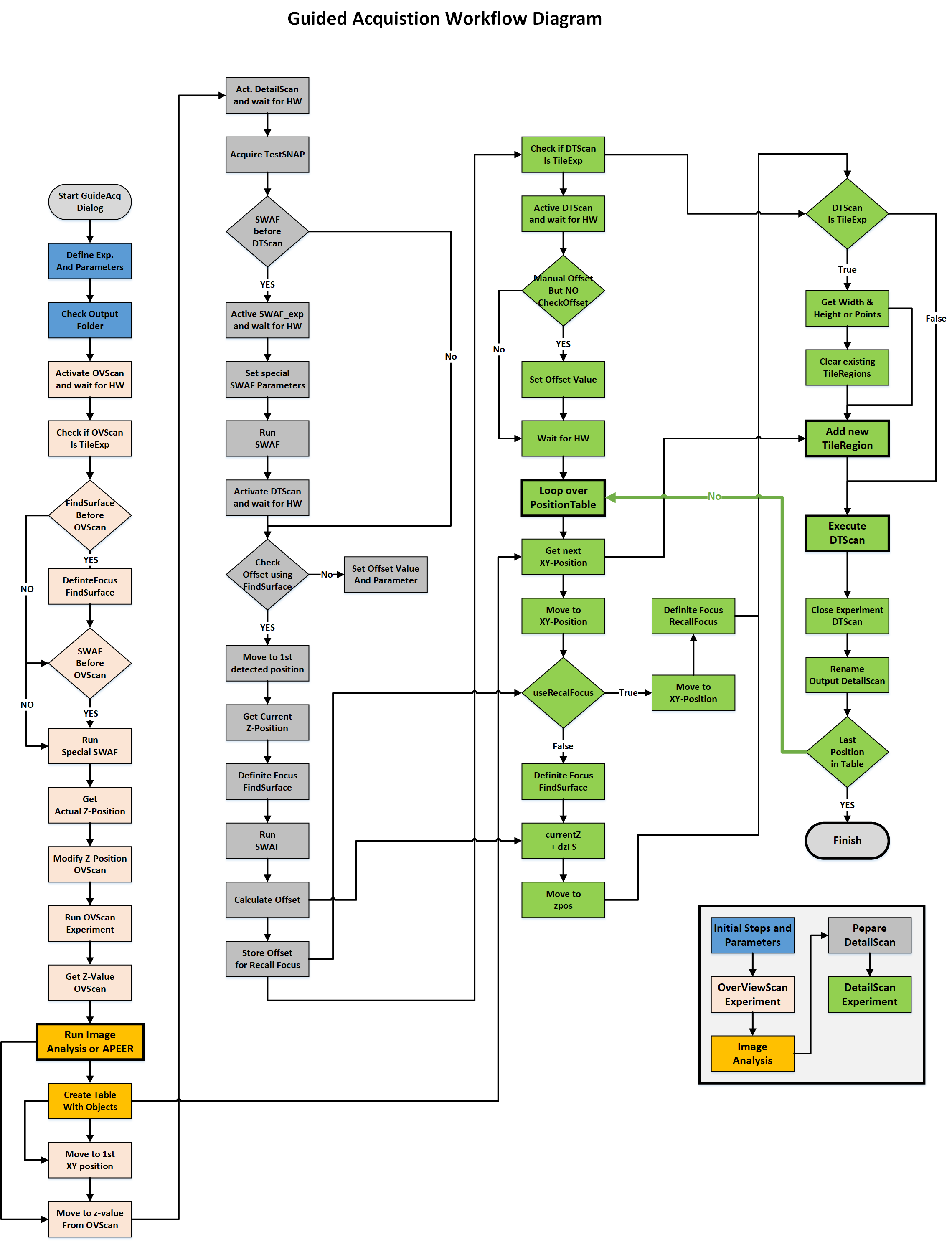
Detailed source workflow for scripted Guided Acquisition
The script exposes processing, target selection, experiment changes, and external handoffs. Source
  • Customize the overview-to-detail sequence.
  • Use IronPython and ZEN scripting functions.
  • Maintain coordinates, errors, and recovery.
  • Published example: use at your own risk.

Required ZEN capabilities still apply. Open the figure for the full workflow.

Guided Acquisition / gallery

The same selection pattern serves cells and tissues.

Guided Acquisition / applications

Select structures before spending acquisition time.

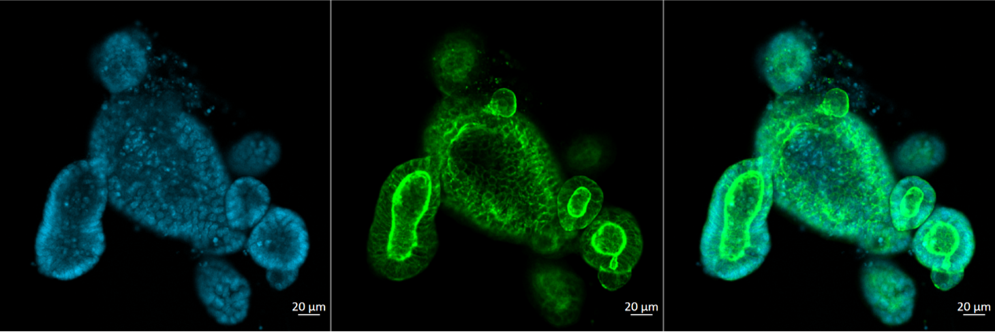
Organoid overview and selected detailed images
Select organoids by image features. Sample: Dr. M. Lutolf, EPFL. Source
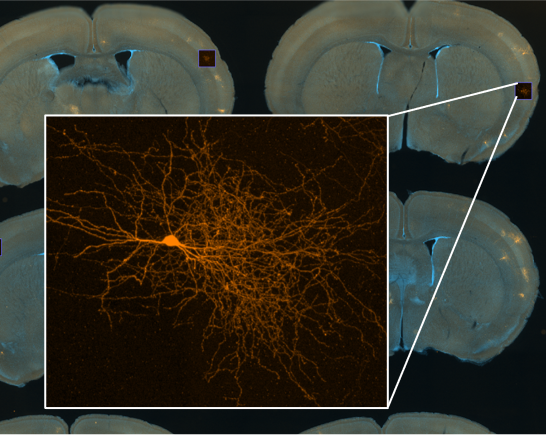
Overview of sectioned mouse brain with a detailed projection of a detected neuron
Find rare labeled neurons. Sample: Dr. L. Lim, KU Leuven. Source

Case study / mitosis

Find the event early enough to follow it.

Prometaphase triggers detailed event-centered acquisition. Source
  1. Screen a broad field.
  2. Segment and filter candidates.
  3. Acquire time-lapse and Z-stacks.
  4. Measure anaphase initiation.

Sequential wells reduce delay. Classification errors and stack time still limit useful throughput.

Case study / one overnight run

Selected positions include true events and false positives.

266 mitotic events
34 false positives
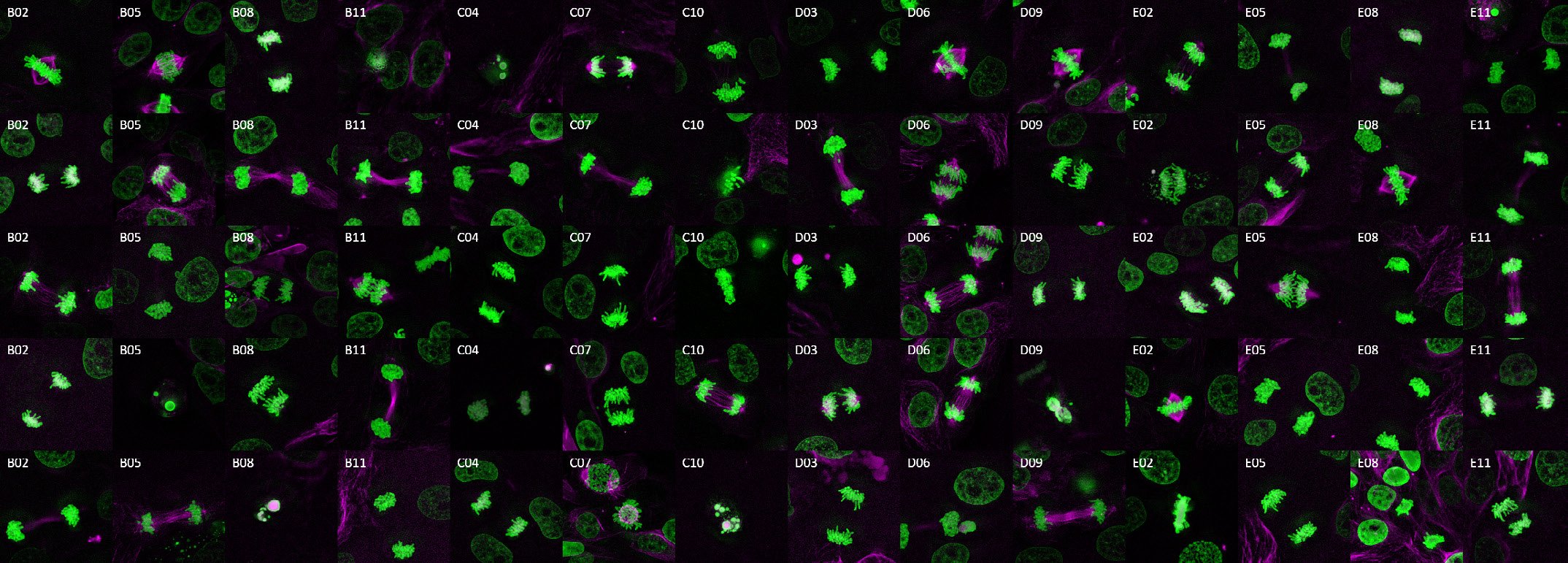
300 positions: 266 mitotic events; 34 false positives, mainly apoptotic cells. Source
The montage combines event-centered acquisitions from this run. Source

A reported experiment, not a general accuracy or throughput guarantee.

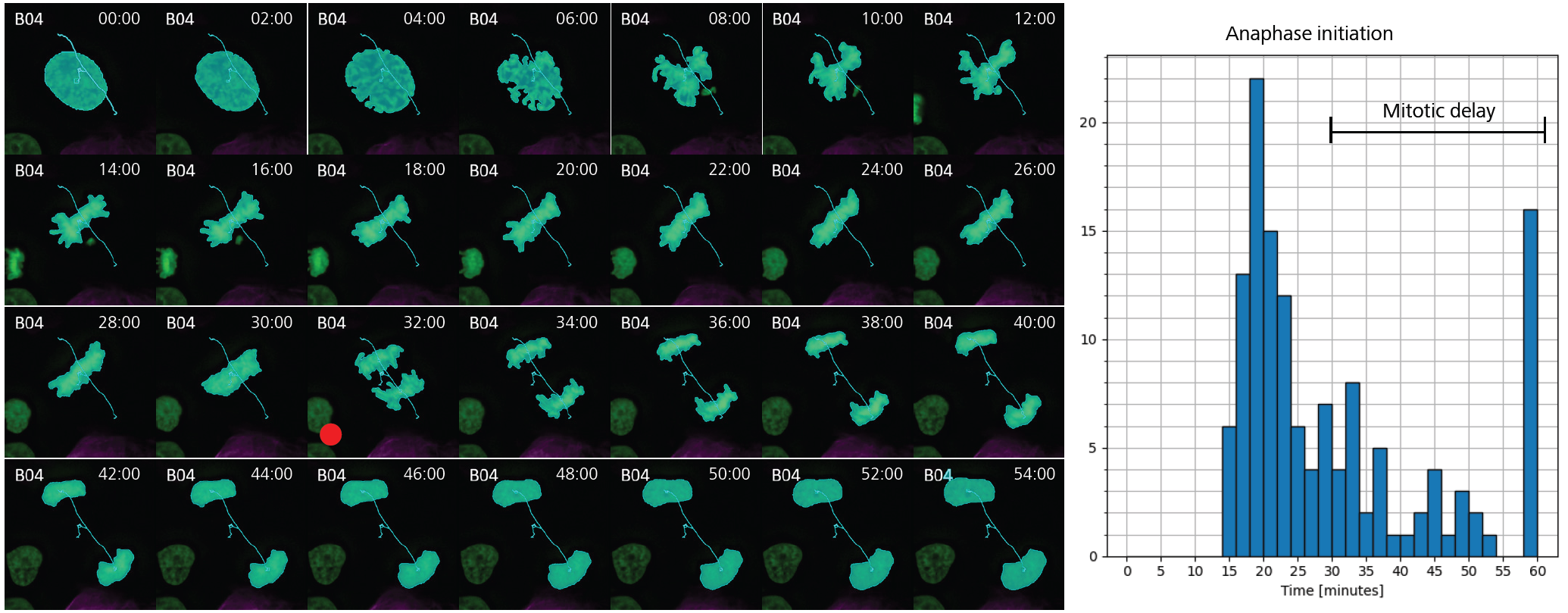
Case study / biological readout

Measure the biology, not just the image count.

Cell-division montage with marked anaphase initiation and a distribution of event timing
Downstream analysis identifies anaphase initiation and the distribution of event timing. Source

Case study / custom OAD

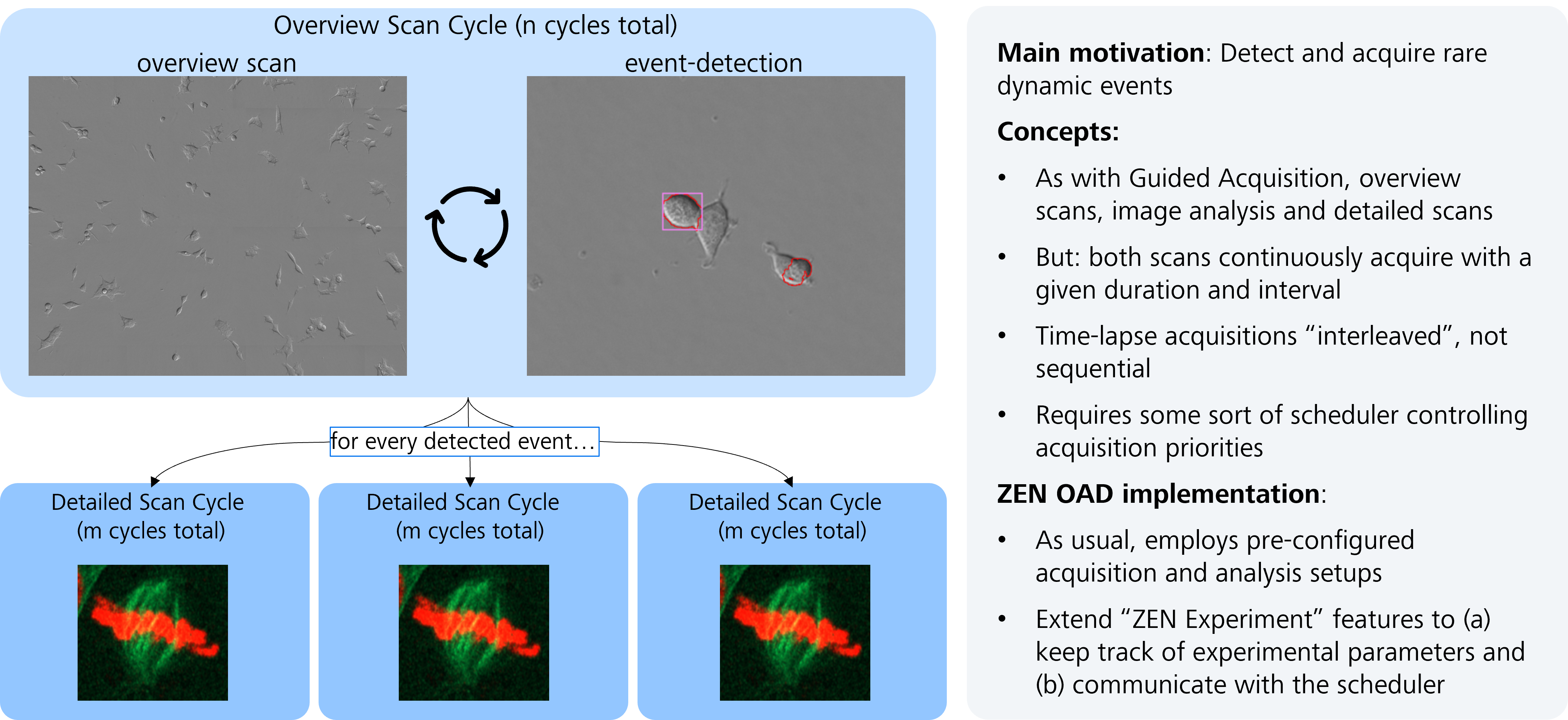
A scheduler coordinates overview and event acquisition.

OAD smart imaging example shows continuing overview and detailed acquisition cycles
Custom OAD logic connects detection and detailed event acquisition. Source
Repository demo with simulated data; 4x playback is not a real-time latency measurement. Source

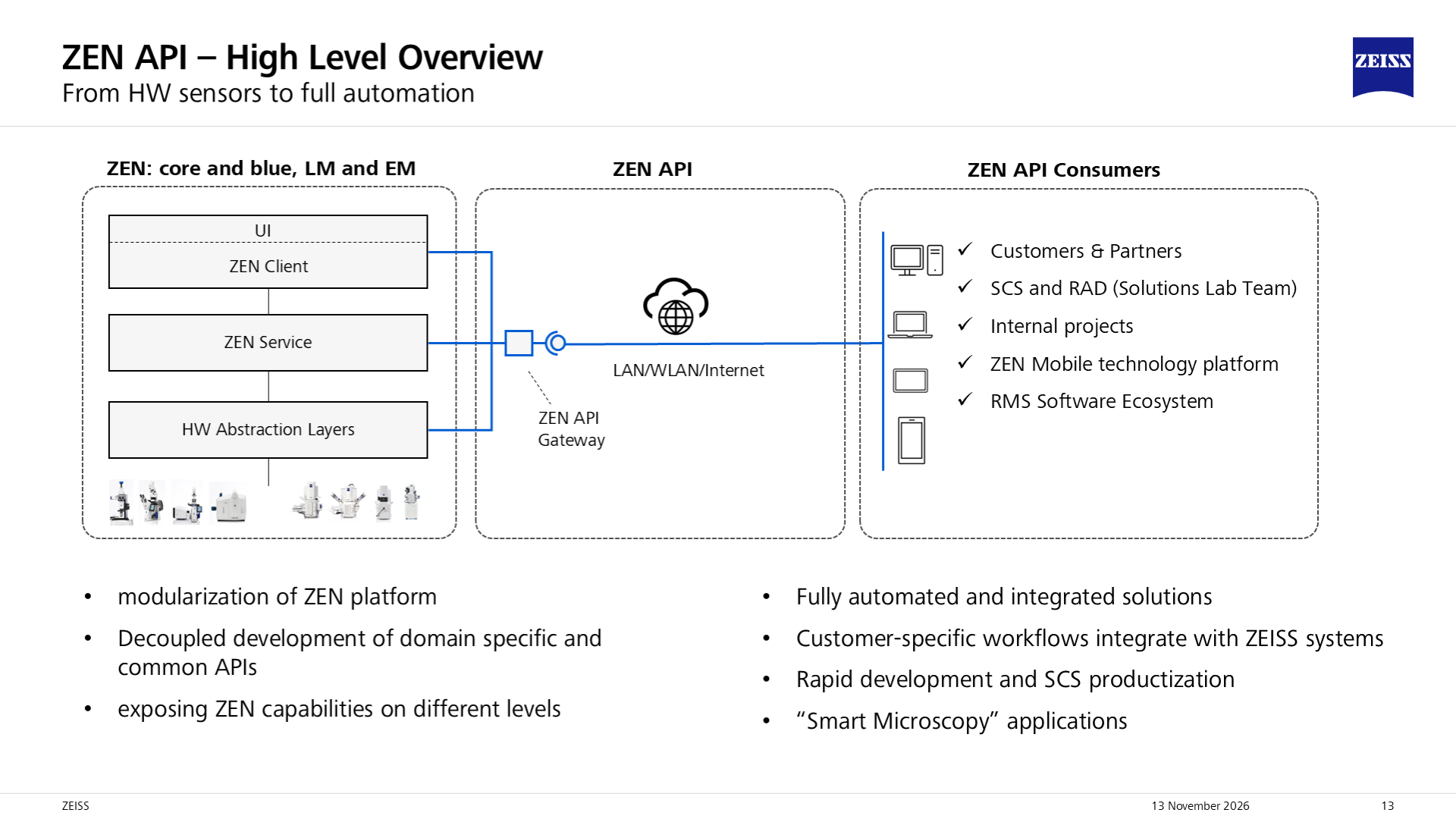
ZEN-API / architecture

Your application decides. ZEN executes acquisition.

Original ZEN API architecture shows external consumers connecting through a gateway to API providers in the ZEN ecosystem
Client calls; gateway routes; ZEN providers implement available services. Illustration: Sebastian Rhode, ZEISS. Source

Typed services, not mouse clicks. The gateway shares access and service descriptions; providers register capabilities. Complements OAD, not every internal function.

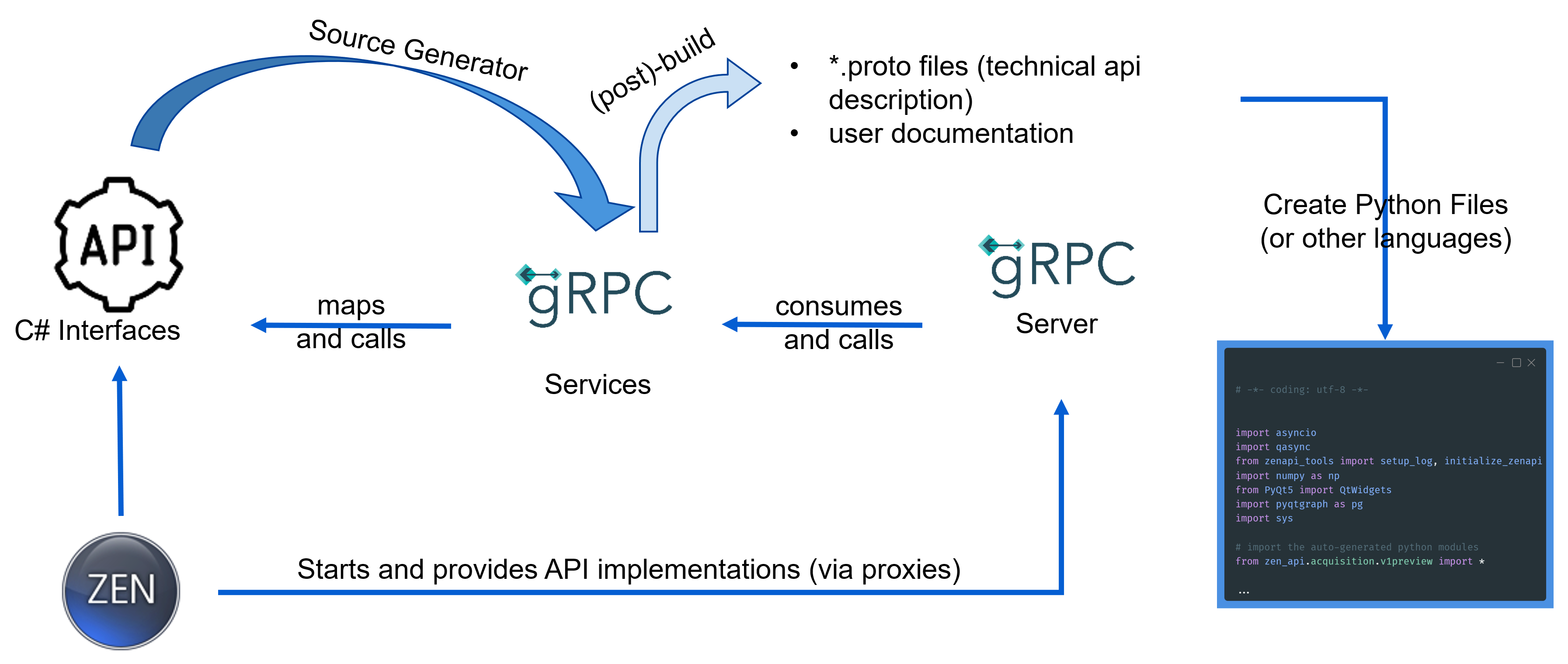
ZEN-API / contracts

A typed contract connects different languages.

Source illustration connects C# interface definitions, protocol-buffer contracts, gRPC services and generated client code
Protocol Buffers define messages; gRPC transports calls and streams; generated stubs expose them to the client. Source

gRPC uses HTTP/2. A contract is not a microscope driver; generated client code cannot add unsupported server features.

ZEN-API / Python layers

Generated contracts and workflow helpers have different jobs.

The client stack

  • zen_api: generated messages and gRPC wrappers.
  • zen_api_utils: separate connection and workflow helpers.
  • NumPy, AI, and visualization: client-side choices.

Match the running system

  • Package version is not a service namespace.
  • v1 and v1beta can coexist.
  • Methods depend on server, edition, and instrument.

Newer reviewed contracts do not imply ZEN 3.14 support.

ZEN-API / PixelStream

Process pixels while ZEN acquires.

Semantic segmentation extracts candidate structures in an external Python client. Source
Noise2Void denoises streamed images; throughput depends on model and hardware. Source

Processing is not feedback until a rule triggers a supported action.

ZEN-API / frame context

Keep acquisition context with the pixels.

KeepUse it to
Experiment ID + frame numberIdentify data, not just arrival time.
T / Z / C / tile / scenePlace frames in acquisition dimensions.
Position + scalingConvert image results to physical locations.
Pixel type + full-frame sizeDecode the correct type and shape.
Payload offset + sizeReassemble partial data at the correct location.

Raw responses may contain partial frames. Raw bytes are not yet a NumPy image.

ZEN-API / receiving pixels

Choose delivery and manage processing lag.

These are engineering choices, not a hard real-time guarantee.

napari / operating modes

Watch, start, or store an acquisition.

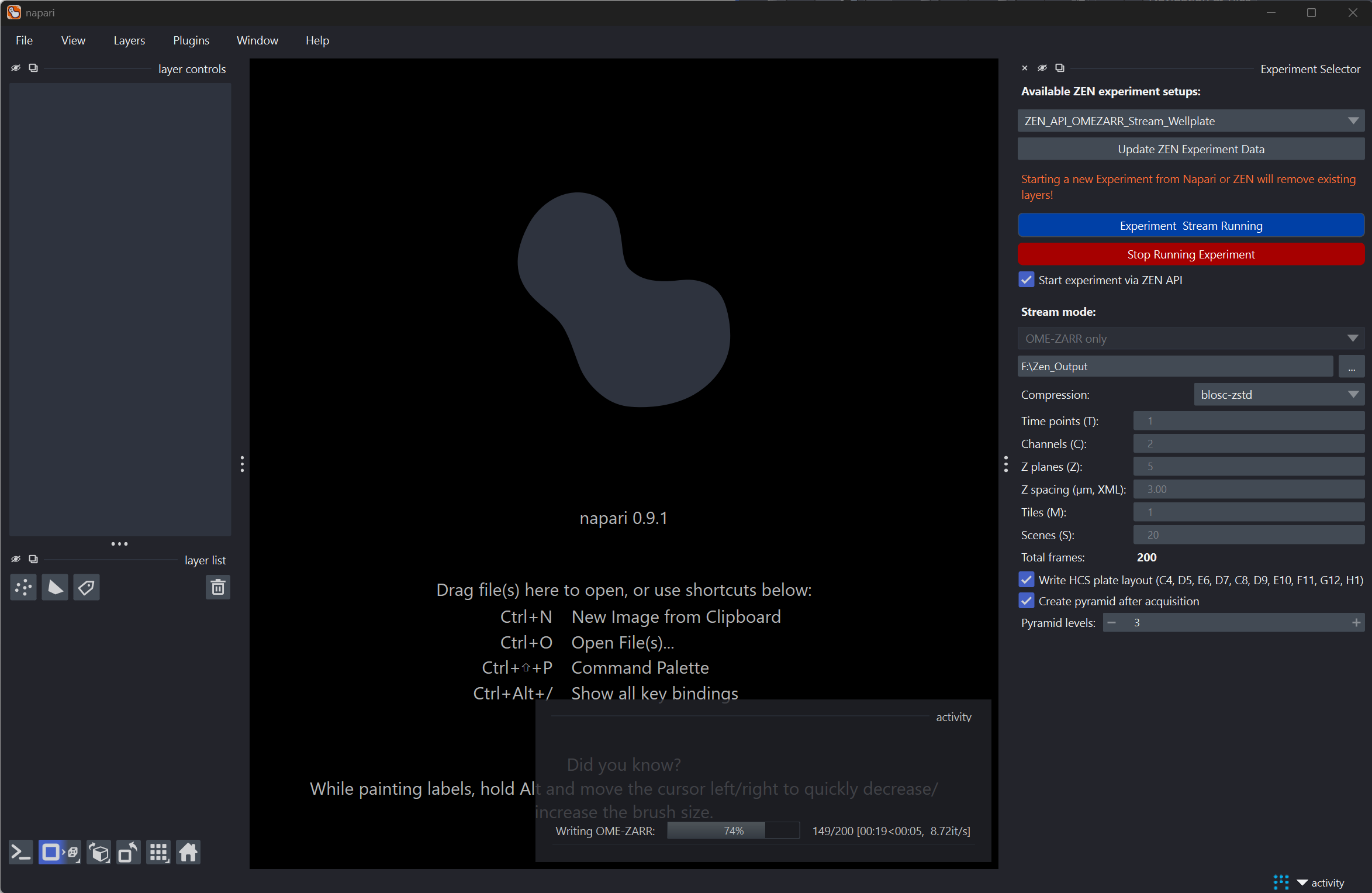
napari ZEN API Streaming widget shows experiment selection, OME-ZARR-only mode, acquisition dimensions, and writer progress
The plugin exposes experiment selection, streaming, and OME-Zarr output controls. Source
  • Watch: ZEN starts; napari listens. Run only one acquisition.
  • Start: read experiment XML; filter by the returned experiment ID.
  • OME-Zarr only: dedicated channel and writer; start or arm before manual acquisition.

Connecting alone does not start acquisition.

napari / live demonstration

A Python viewer receives pixels from ZEN.

napari-zenapi-streaming is an external client, not a replacement acquisition engine. Source

napari / display versus storage

Preview values are not raw measurement values.

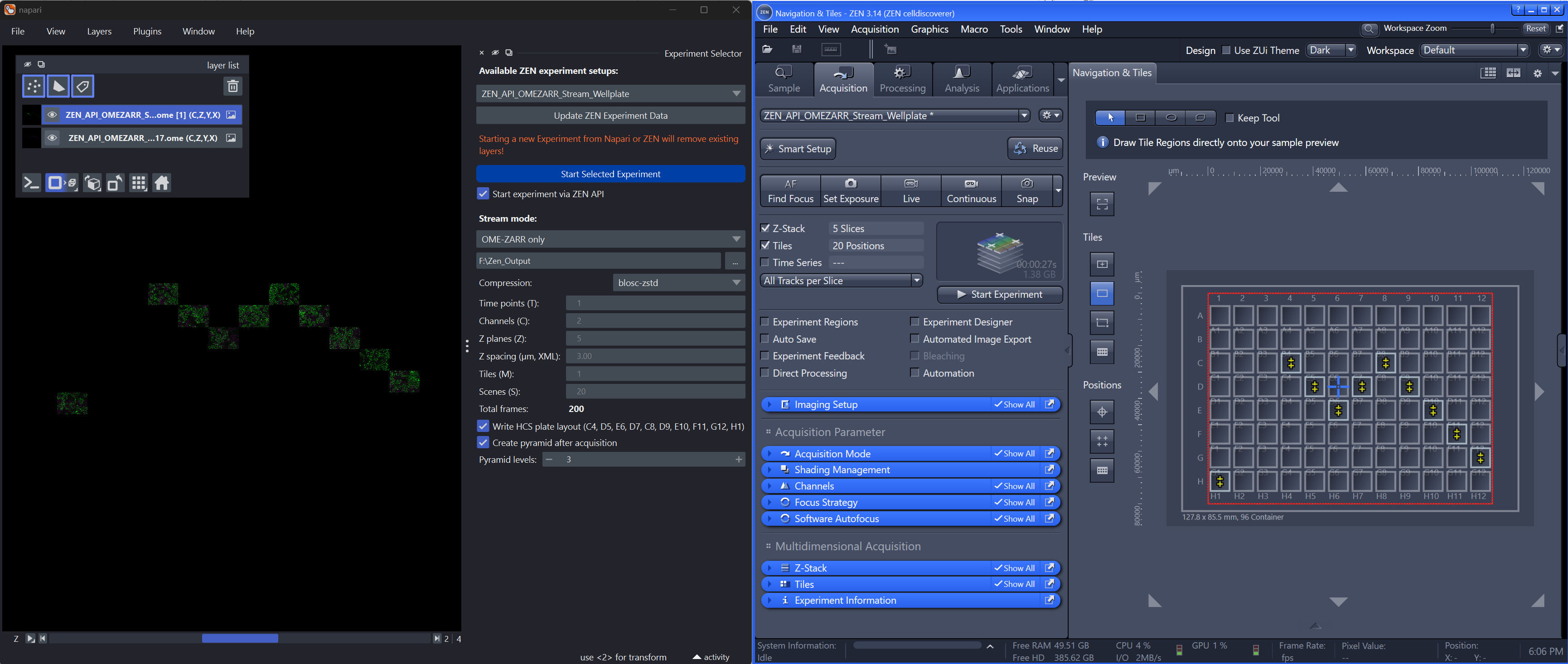
napari displays data from a streamed OME-Zarr beside the selected ZEN well-plate acquisition
Stored OME-Zarr opens in napari after acquisition and optional pyramid generation. Source
  • Display normalizes assumed uint16 frames.
  • Received frames remain available for scene mosaics.
  • Small live previews do not mean constant memory.
  • The direct writer preserves GRAY8 / GRAY16; not color.

napari / operating limits

Check completeness and compatibility separately.

Did all frames arrive?

  • Final pixels may follow acquisition-finished status.
  • Started Display runs check unique frame count, with inactivity fallback.
  • The configured writer checks coordinates; inspect acquisition_status.json.
  • Older unconfigured CLI lacks equivalent certification.

Does this setup match?

  • Alpha / MVP; primarily ZEN Blue on Windows.
  • Python 3.12-3.14; API 2026.5.1-2026.11.1.
  • Install compatible API and utility wheels in napari's environment.
  • Remote Linux streaming is experimental, not hardware-certified.

napari / existing CZI data

File viewing is a separate workflow.

napari-czitools reads existing CZI data; this is neither PixelStream nor microscope control. Source

The recording is not a general file-size or loading-speed benchmark.

Additional Applications using ZEN-API / receiving-only baseline

Receive and display pixels without processing.

PixelStream baseline: receive and display, without processing. Source

The earlier segmentation and denoising demos use separate custom clients, not implied napari-plugin features.

ZEN-API / external Guided Acquisition

Make the analysis-to-acquisition handoff explicit.

External analysis returns targets for selected detailed acquisitions. Source
  1. Acquire the overview; wait for data.
  2. Analyze images in the client.
  3. Validate targets and physical coordinates.
  4. Clone a detail recipe; update regions.
  5. Acquire targets; retain results and errors.

ZEN-API / workflow ownership

Delegate acquisition blocks, not mouse clicks.

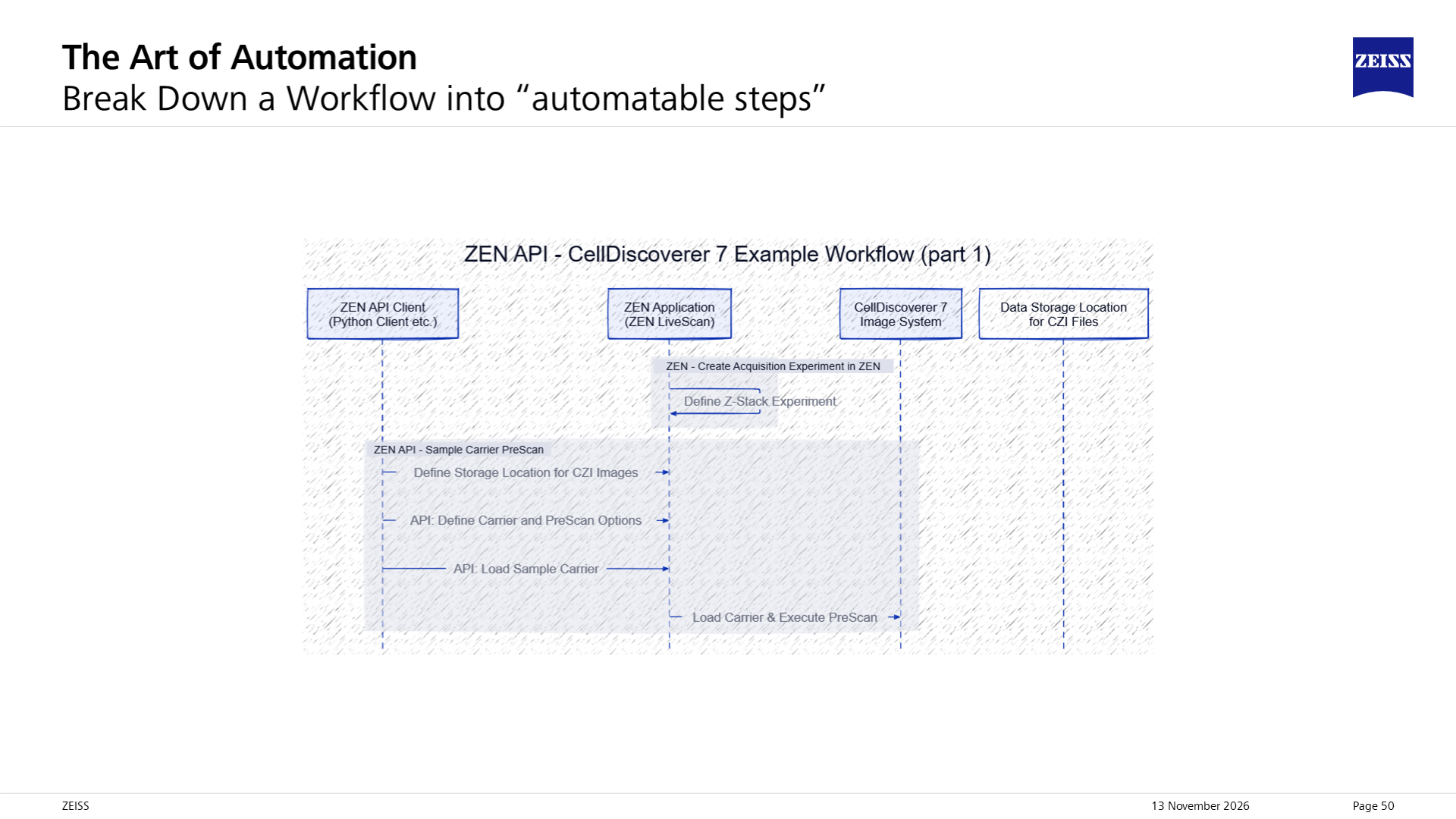
Source sequence illustration divides a CellDiscoverer workflow between an external client, ZEN, the imaging system and data storage
Client, ZEN, instrument, and storage execute different workflow blocks. Illustration: Sebastian Rhode, ZEISS. Source
  • Client sequences wells, focus, data readiness, and analysis.
  • Sequence hardware; overlap analysis with prior files.
  • Core jobs are not experiments; check edition-specific services.
  • Guided example: API + TCP/IP; region sizes in meters.

Convert region coordinates first. Carrier handling is instrument-specific.

Workshop examples / control and data

Connect control to Python image access.

Control and acquire

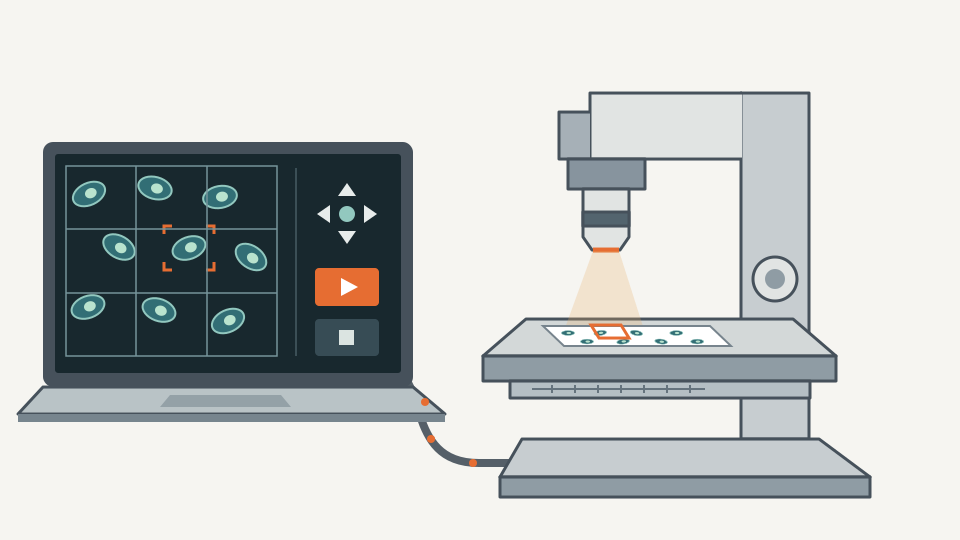
A computer displays cell images, a selected target, acquisition tiles and stage controls beside a connected microscope illuminating a selected specimen region
External control and image delivery; conceptual illustration. Source

Stage, focus, regions, Z-stacks, streaming, and guided acquisition.

Control examples

Read CZI in Python

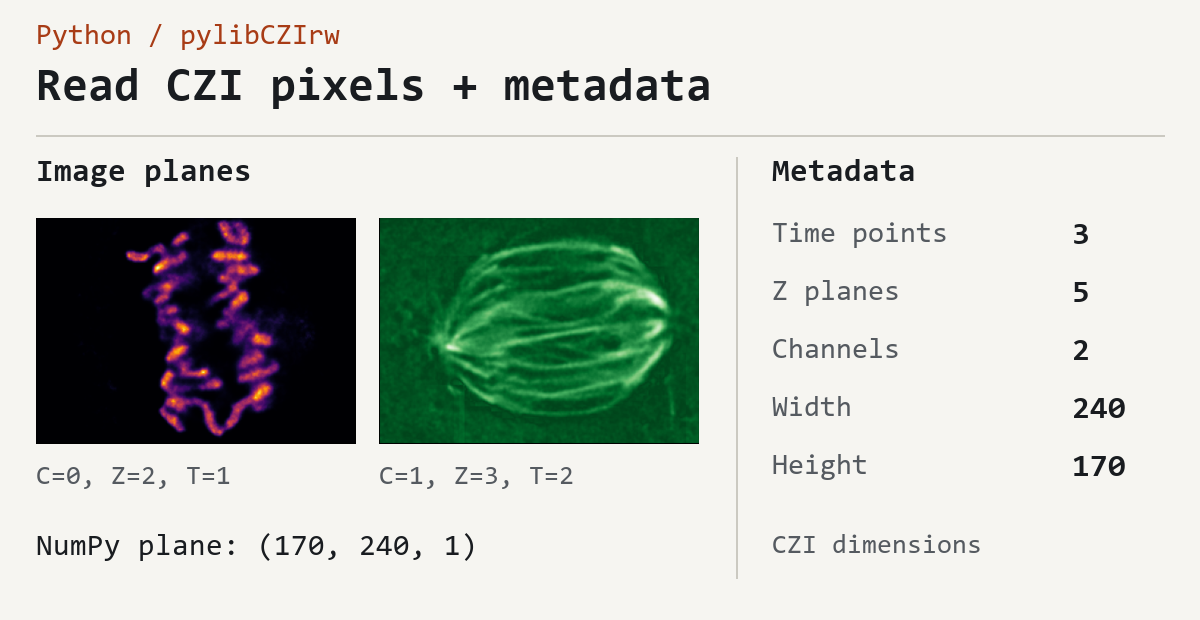
Python pylibCZIrw output pairs two CZI image planes with NumPy array shape and metadata for time points, Z planes, channels, width and height
Saved pylibCZIrw output shows planes, shape, and metadata. Source

Read pixels and metadata. Write CZI or export OME-Zarr; try lazy access.

CZI examples / VZIP needs its unchanged original CZI.

Workshop examples / models and measurements

Turn images into predictions and biological readouts.

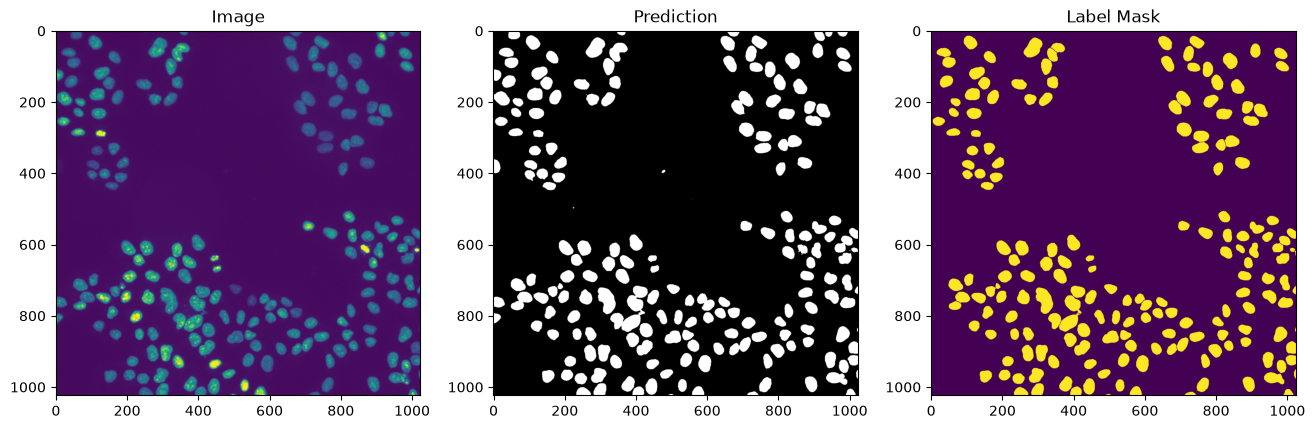
Deep learning

Saved notebook output compares a fluorescence image, predicted nuclei segmentation and the label mask
Saved input, prediction, and labels; not an accuracy benchmark. Source

Inspect CZANN, run ONNX, or train/export a PyTorch model. Match preprocessing.

Deep-learning examples

Translocation

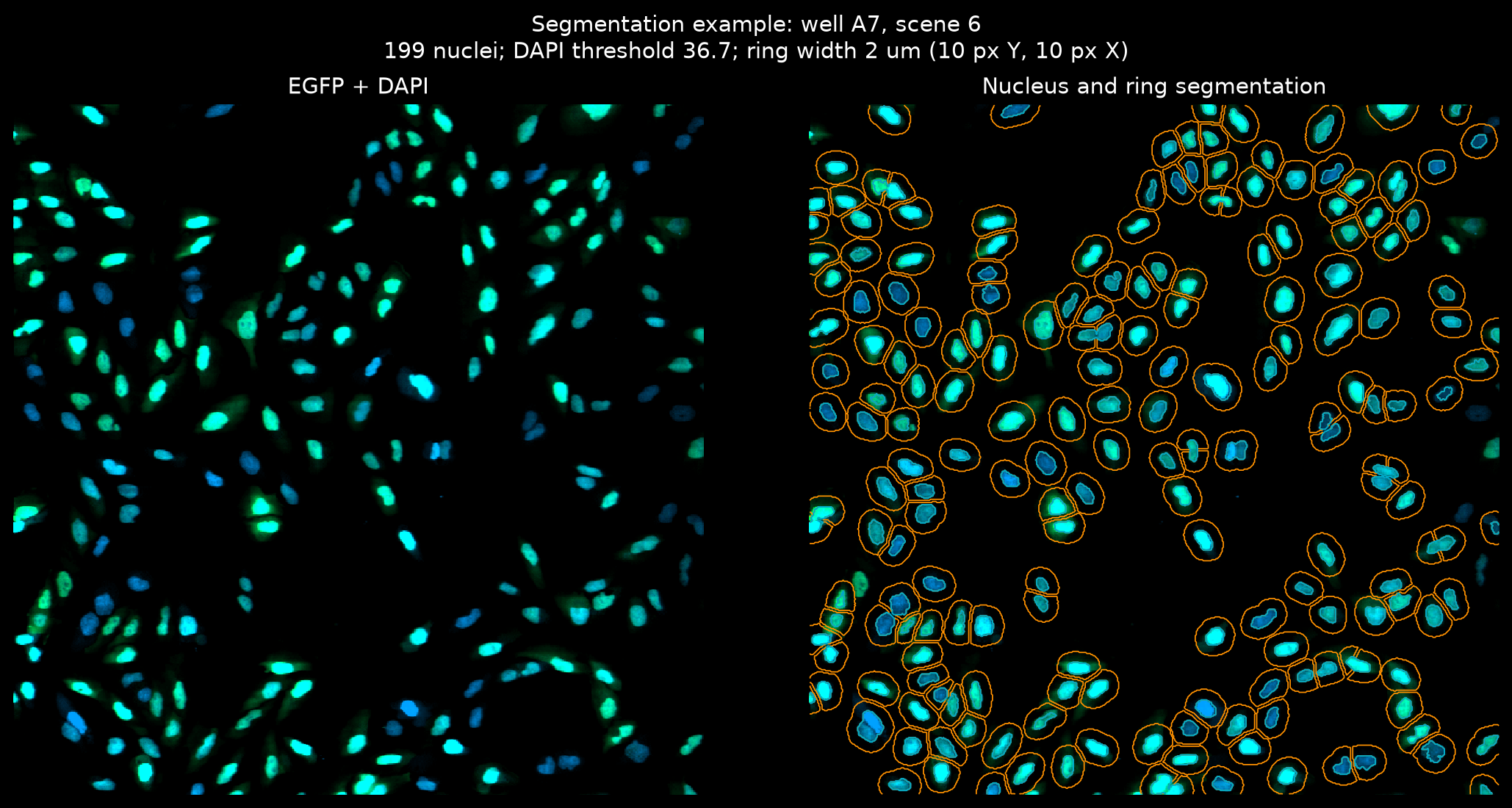
Translocation assay example compares EGFP and DAPI images with segmented nuclei and surrounding cytoplasmic rings
Segment nuclei and rings to measure EGFP translocation. Source

CZI/OME-Zarr plates yield cell/well measurements, heatmaps, and dose-response fits.

Assay example / Walkthrough

Takeaway

Observe. Decide. Act. Check the result.

Monitoring becomes Smart Microscopy when sample information drives a supported, validated acquisition decision.

Use the simplest route that fits: module, Feedback, OAD, or ZEN-API.

Workshop code is educational. Review inputs, outputs, model assumptions, and approved instrument procedures before use.

Links and additional info

Start with the documentation for your ZEN system.

Links and additional info / media and credits

Keep the sources and the caveats with the examples.

ZEISS / Sebastian Rhode. Mitosis contributors: Marion Lang, Sandra Orthaus, Phillip Seidel, Pierre Menard, and colleagues.

napari plugin: Krijn H. van der Steen, UMC Utrecht, and Sebastian Rhode, ZEISS. Sample credits accompany the figures.

Educational demonstrations, not support, speed, or accuracy guarantees. No additional redistribution rights. Videos play on request; this deck runs no microscope code.